The friction usually starts after the vulnerability is identified. Screenshots are saved. Notes are copied. The finding is rebuilt somewhere else.
The Neuron Burp Suite Extension removes that duplication.
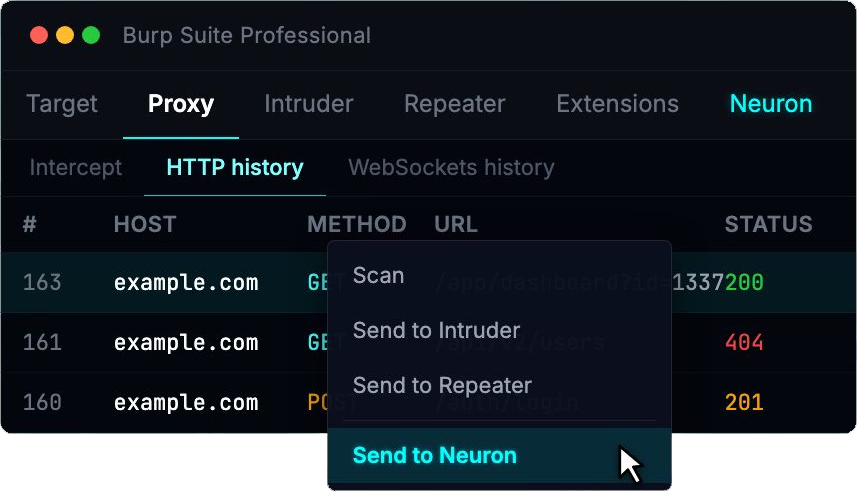
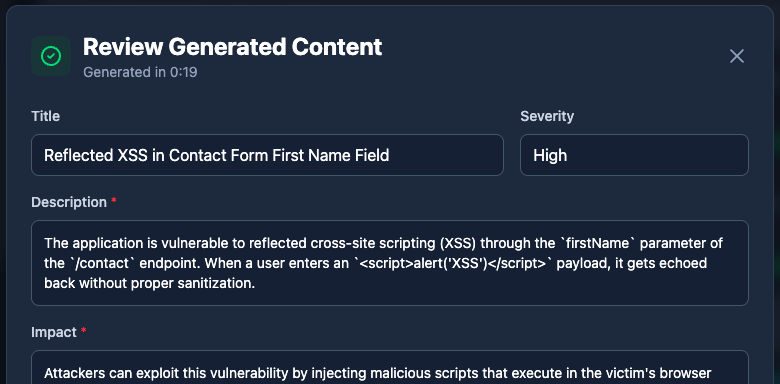
From within Burp, you can push an issue directly into Neuron. The finding is created in the correct engagement, linked to the appropriate web application and endpoint, and request/response evidence is preserved automatically.
The workflow becomes:
Proxy → Structured Finding → Report
Not:
Proxy → Notes → Screenshot folder → Word → Rebuild
Burp remains your testing engine. Neuron becomes the system of record.
Web Applications as First-Class Assets
Web apps don’t map cleanly to a simple host-and-port model. They have logical boundaries, authentication flows, endpoints, parameters, APIs, and business logic that require context.
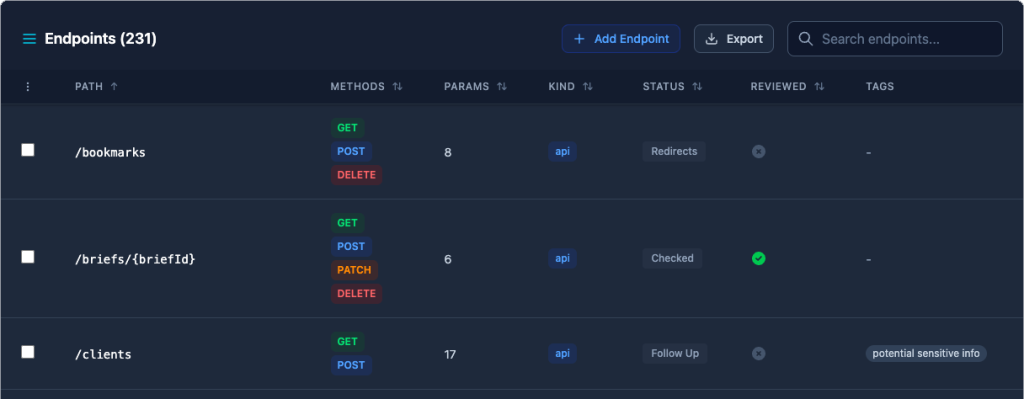
Neuron now lets you define Web Applications inside an engagement and associate:
Hostnames and ports
Endpoints
Parameters
Tags and scope metadata
Findings tied directly to specific endpoints
Findings are no longer detached blocks of text. They are connected to the exact surface they impact.
On larger engagements, this makes it significantly easier to answer practical questions:
What parts of the application were tested?
Which endpoints contain findings?
Where are we reusing issues across clients?
What was in scope versus out of scope?
Reporting becomes a reflection of the work performed, not a reconstruction afterward.
Why This Matters for Teams
For fieldword testers, this reduces duplicate effort.
For managers, it standardizes how web findings are written and stored.
For growing practices, it ensures that web application testing lives inside the same structured system as network and internal assessments. No separate trackers. No disconnected reporting pipelines.
Web Application Testing and the Neuron Burp Suite Extension are available now.
For almost a decade, we’ve had the privilege of watching many of you grow. What began as individual practitioners and small teams has evolved into established security organizations operating across regions and time zones. PenTest.WS has supported that growth through thousands of engagements, countless findings, and more report iterations than we can reasonably count.
Today, we’re announcing something we’ve been building quietly for the past two years: Neuron – a security engagement management platform designed for teams operating at enterprise scale.
Before we go any further: PenTest.WS isn’t going anywhere.
Your Hobby and Pro accounts will continue working exactly as they do today. This isn’t a sunset announcement. It’s an expansion.
The Problem With Scale
As your teams have grown, we’ve heard the same challenges come up again and again.
Your report turnaround is bottlenecked by documentation, not testing. Your QA process is held together with spreadsheets, email threads, and Slack messages that start with “hey, can you review this?”
Your clients want visibility into engagement progress without you manually exporting PDFs every few days.
PenTest.WS Pro gave you the foundation: self-hosted deployments, real-time collaboration, and air-gapped support. But enterprise teams managing dozens of concurrent engagements need more than a foundation. They need workflows built for scale.
So that’s exactly what we built.
Meet Neuron
Neuron takes everything you know from PenTest.WS and adds the enterprise capabilities that larger teams have been asking for. Built by the same team, with nearly a decade of experience watching how security teams actually work.
Here’s what’s new:
AI-Powered Reporting
Your team’s expertise should go into finding vulnerabilities, not writing the same boilerplate for the hundredth time.
Neuron’s AI reporting assistant generates consistent, professional content across all your reporting fields such as finding descriptions, business impact, and remediation guidance. Combined with your reusable finding library that now supports scope-specific variants, your team can document findings in seconds instead of hours.
Teams running Neuron are delivering reports up to 3x faster than their previous workflows. That’s not marketing speak, it’s consistent feedback from early adopters.
Multi-Stage QA Workflows
Quality assurance shouldn’t be an afterthought bolted onto your process. Neuron makes it native.
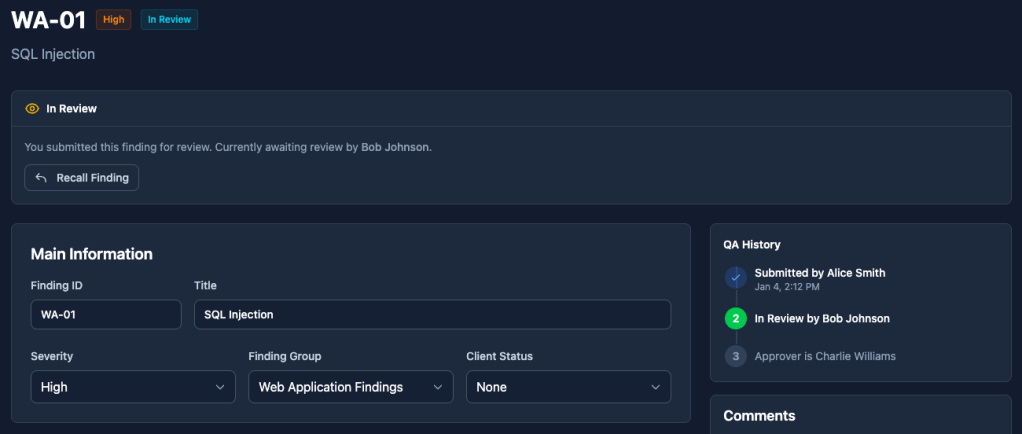
Every finding moves naturally through your QA pipeline: Draft → Review → Approved. You set who can review, and who can approve. The system enforces it automatically.
Role-based access controls ensure the right people have the right permissions. A complete audit trail tracks every change, every approval, every comment – critical for compliance-heavy clients and government work.
No more wondering if that finding was reviewed. No more “who approved this?” conversations. No more findings slipping into client reports without proper sign-off. The workflow catches it before it becomes a problem.
For teams juggling multiple engagements across multiple clients, this alone changes how you operate.
Client Portal
Stop exporting PDFs. Stop sending slide deck status update emails. Give your clients what they actually want: visibility.
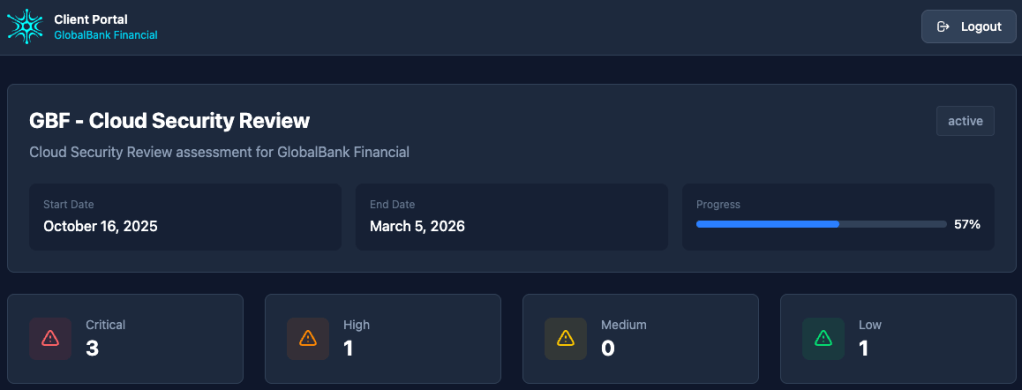
Neuron’s client portal provides secure, read-only access for your clients to track engagement progress in real-time. They see what you want them to see, when you want them to see it. Findings appear as they’re approved through your QA workflow – not before.
Set up time-bound file sharing links for deliverables. Brand the portal with your firm’s logo and colors. Your clients get a professional experience; you get fewer “what’s the status?” emails.
For firms managing ongoing relationships with enterprise clients, the portal transforms how you communicate progress without adding overhead to your team.
Who It’s For
If you’re a solo operator or small team happy with PenTest.WS Pro, stay where you are. It still delivers everything you need for individual practitioners and small teams.
Neuron is purpose-built for teams that have outgrown individual workflows:
Boutique pentesting firms scaling from 5 to 50 operators who need structured QA
Enterprise internal security teams managing ongoing assessment programs with compliance requirements
MSSPs juggling multiple client engagements who need portal access for their customers
Government and defense contractors requiring audit trails and approval workflows
If your team is wrestling with QA bottlenecks, client communication overhead, or documentation that takes longer than the testing – Neuron was built for you.
Two Products, One Team
We want to be crystal clear: PenTest.WS and Neuron are separate products serving different needs.
PenTest.WS remains fully supported for Hobby and Pro tier users. We’re not abandoning the platform that got us here. We’re committed to keeping PenTest.WS running smoothly for the community that’s trusted us for years.
Think of it this way: PenTest.WS is the toolkit for operators. Neuron is the platform for enterprise operations. Different scales, same team behind both.
See It In Action
We’ve put everything we’ve learned from nearly a decade of building pentesting tools into Neuron. We’d love to show you what it can do.
Visit neuron.ws to explore the platform, see the full feature breakdown, and request a personalized demo.
Thanks for being part of this journey. We built PenTest.WS because we all needed better tooling. We built Neuron because we watched teams outgrow those tools into needing enterprise workflows.
Same mission. Bigger scale.
Thanks for reading, The PenTest.WS Development Team
Version 2.5 is here, and it comes with three major features that elevate your work inside PenTest.WS — from organizing findings, to building reports, to managing files during engagements.
Findings Groups
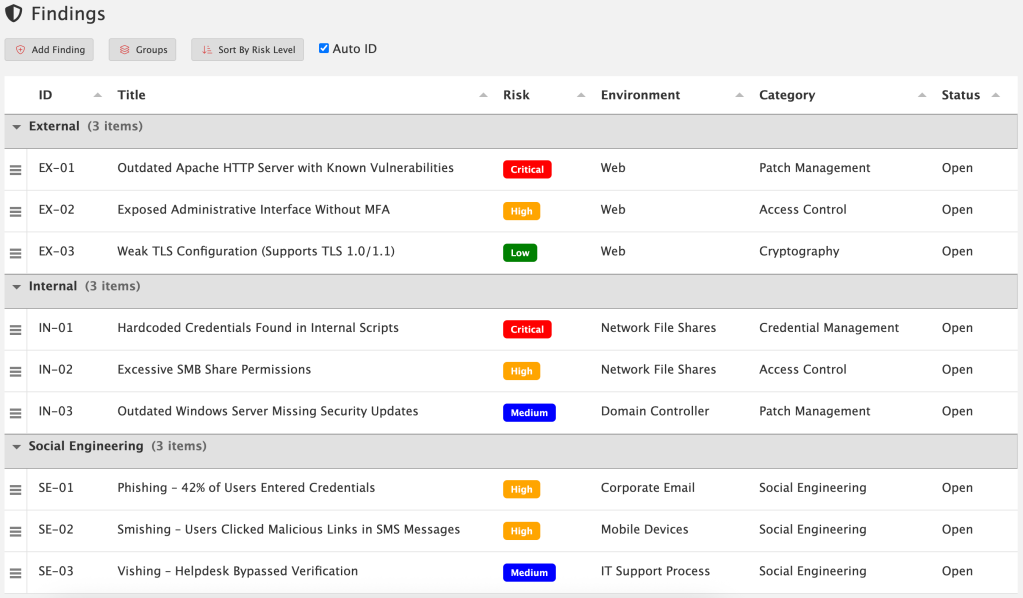
Findings Groups give you a new way to organize your findings inside an engagement. By default, findings are still just a flat list — nothing changes unless you want it to. But Pro Tier members can now create custom groups and drag findings into them.
Want to separate issues by External, Internal, and Social Engineering workstream? Easy! Create groups that match your own workflow, methodology, or reporting style. You’re in control.
These groups carry over directly into reporting, so the structure you set in your engagement automatically shows up in your exported reports. To take advantage of this capability, you’ll need to update your reporting templates with the new grouped fields. Once that’s done, your reports will reflect the same organization you defined during the engagement — resulting in cleaner structure, clearer communication, and less manual sorting later on.
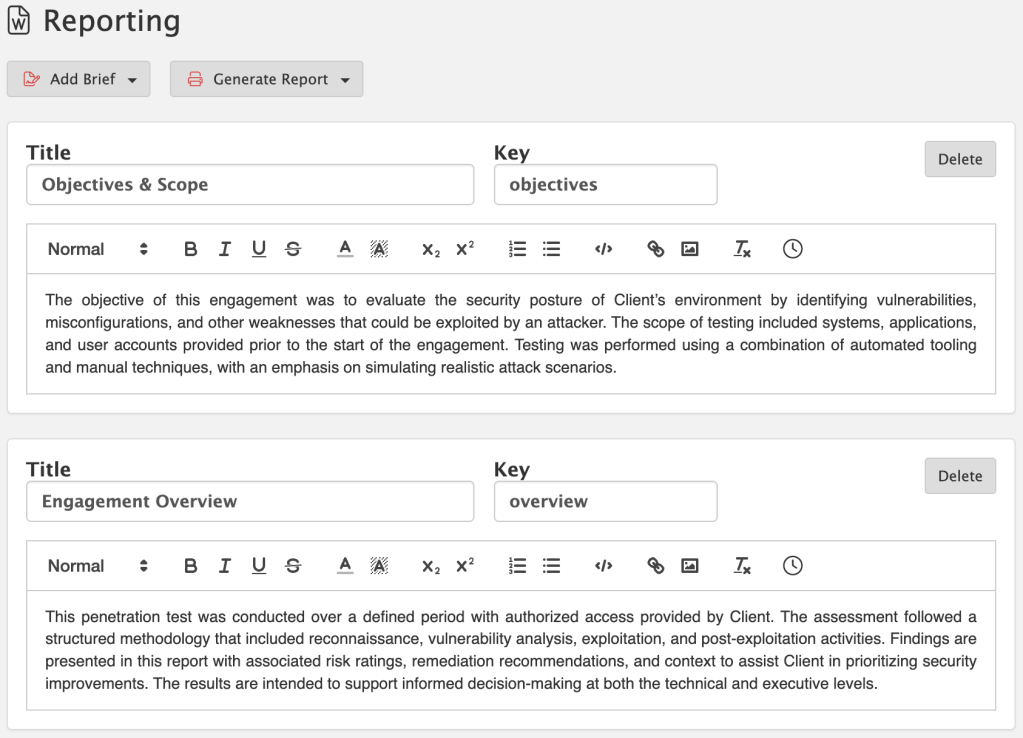
Reports are more than just technical data — they need a narrative. That’s where Reporting Briefs come in. Briefs give you a starting point of reusable content that can be customized for each engagement. Whether it’s a methodology section, an executive summary, or a tailored explanation for C-level readers, you can maintain a library of briefs and then fine-tune them as needed.
This means no more copy-paste from old documents. Your content lives directly inside PenTest.WS, ready to be reused, edited, and adapted whenever you need it.
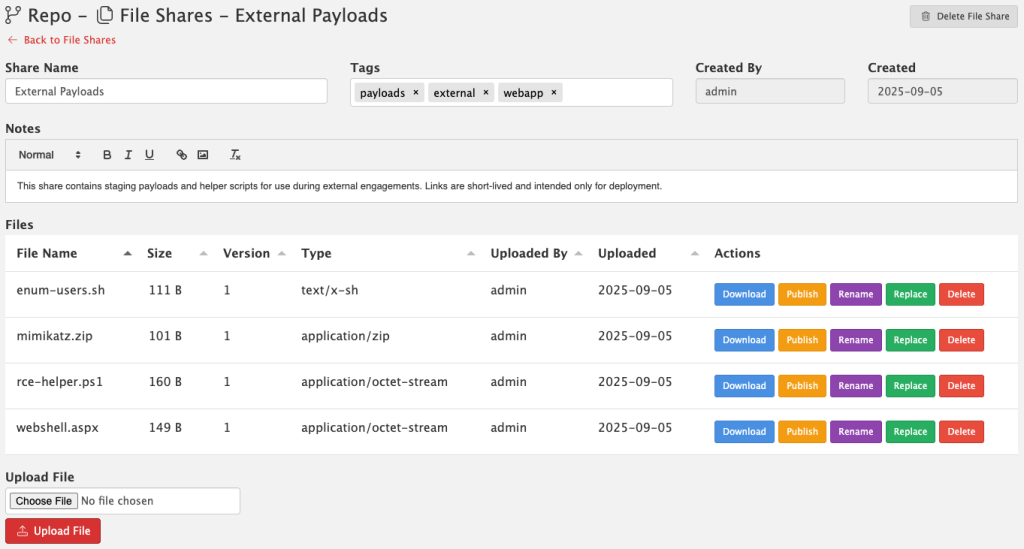
Version 2.5 also introduces File Shares, a brand new way to manage files directly inside PenTest.WS. This feature is built for pentesters who need a secure, team-friendly way to store and share files without relying on third-party services.
Secure – Files are stored locally on your server, never uploaded to the cloud.
No AV/EDR Scanning – Nothing interferes with your payloads, tools, or artifacts.
Versioning Built In – Track file changes over time.
Shared With Your Team – Files are available right inside your PenTest.WS workspace, without extra permissions or ACL headaches.
When you need to push files out to a live target during an engagement, File Shares makes it simple. You can generate a short-lived public URL that expires automatically, giving you a safe, temporary way to deploy files without setting up separate hosting. Once the link is gone, so is the exposure.
File Shares is available exclusively in the Pro Tier On-Premise edition of PenTest.WS.
Version 2.5 isn’t just about new buttons — it’s about making reporting faster, more professional, and more repeatable. With Findings Groups to structure your data, Reporting Briefs to tell the story, and File Shares to manage and deploy files, you’ll spend less time wrangling reports and infrastructure, and more time delivering results.
Ready to take your reporting to the next level? Findings Groups, Reporting Briefs, and File Shares are available now in Pro Tier. File Shares is exclusive to the On-Premise edition. If you’re on Free or Hobby Tier, upgrade today and unlock these new tools built for professional engagements: https://store.pentest.ws/
We’re excited to drop a massive quality-of-life upgrade in version 2.4 — one that reflects how professional red teams actually operate. Here’s what’s new:
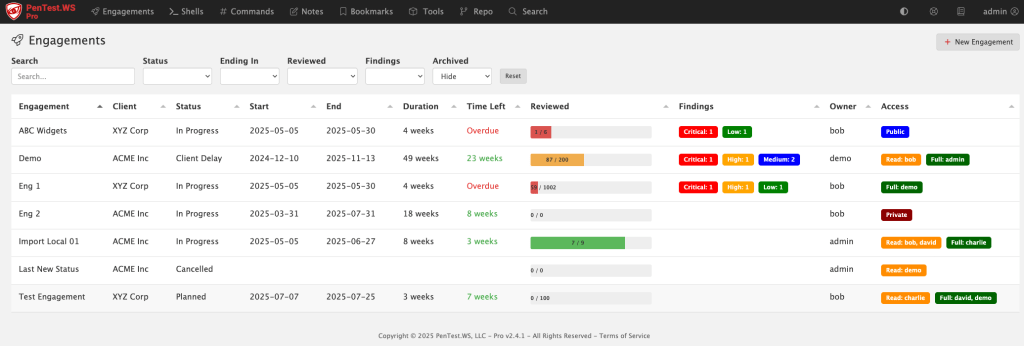
🧭 Pro Tier: Engagements Replace the Dashboard
The old dashboard was built around shells and rooting boxes — but that’s not how pros manage a real engagement. We’ve replaced it with the new Engagements screen, purpose-built for tracking scope, timelines, findings, and more.
🛡️ New Global Findings View (All Tiers)
Free, Hobby, and Pro users now get access to a consolidated Findings screen. It gives you a sortable, filterable view across engagements, sorted by risk, category, or environment.
📅 Engagements Now Have Planning Metadata
Engagements now include Status, Start Date, and End Date fields — all of which are user-configurable and filterable. You can use this for planning, tracking, or just keeping your team organized.
🧪 Matrix Filters for Hosts and Ports
Tired of binary filters? The new triple-filter switch gives you full control: filter for “Yes”, filter for “No”, or don’t filter at all. It’s more intuitive, especially when tracking host review status and port exposure.
💻 Pro On-Premise – HTTP Log View
If you’re running Pro on-premise, you’ll now see an HTTP access log printed directly in your terminal. It’s great for troubleshooting or just keeping an eye on what’s happening under the hood.
🛠️ Admin Control Over Status Field (Pro)
The new status field isn’t hardcoded — it’s company-wide and admin-configurable in the Pro Tier admin panel.
🧠 Smart CIDR Expansion
Adding hosts via CIDR just got easier. If you paste in a range (like 192.168.0.1/24), you’ll be prompted to automatically expand it into individual IPs. (IPv4 only.)
✅ Support System Overhaul
Some support tickets were falling into the void (thanks, spam filters and silent failures). We’ve rebuilt our support system behind the scenes and are actively monitoring the system.
If you’re on Hobby or Free Tier and want access to the new Engagements screen, now’s the time to check out Pro. We’ve got more in the pipeline — stay tuned.
We just launched PenTest.WS v2.3, and it’s a big one, especially if your red team ops go beyond just scanning ports and popping shells. With this release, we’re giving Pro Tier users new tools to track and understand the people behind the infrastructure. Because sometimes the weakest link isn’t a host, it’s a human.
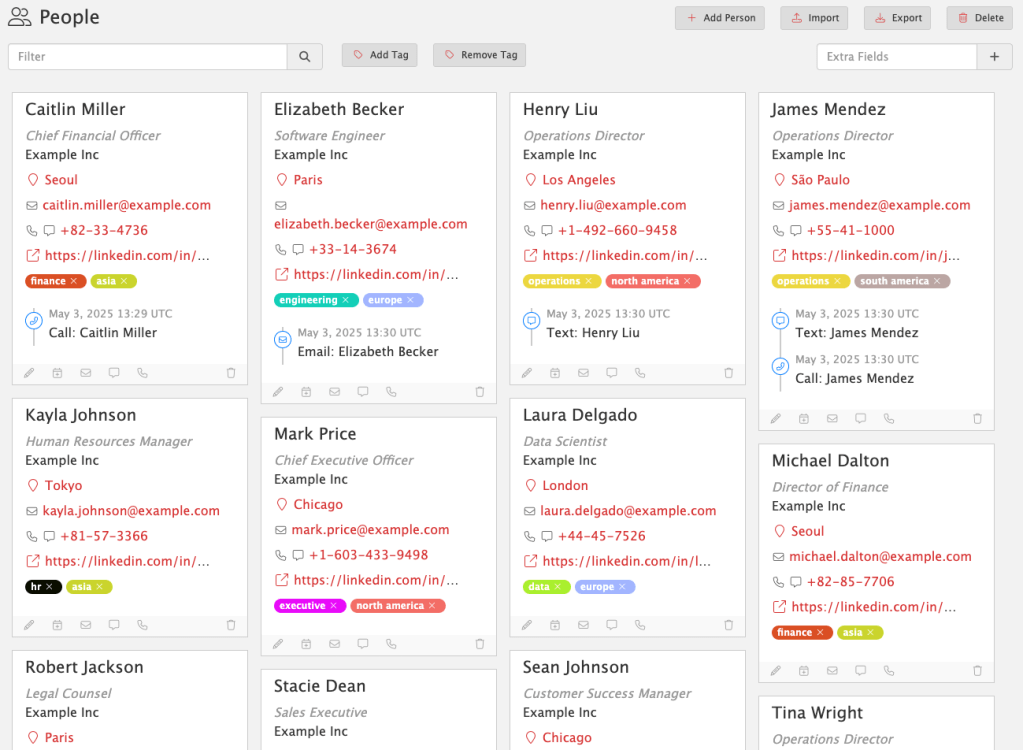
People Hacking
Social engineering is more than just an attack vector, it’s a workflow. And now you can track it like one.
People Hacking gives you a dedicated space to track social engineering targets, tactics, and outcomes. Each person is a first-class object, complete with contact details, tags, profile URLs, locations, and communication history.
People Hacking lets you:
Log phone calls, phishing attempts, texts, or in-person interactions
Assign custom tags to track roles, regions, risk levels, or anything else
Link SE engagements directly to findings as supporting evidence
Capture everything in one searchable, structured view
No more scattered notes or one-off spreadsheets. With People Hacking, social engineering becomes a trackable, repeatable part of your red team ops.
Available now in Pro Tier. Because real-world attackers don’t stop at the firewall, and neither should you.
Events Timeline
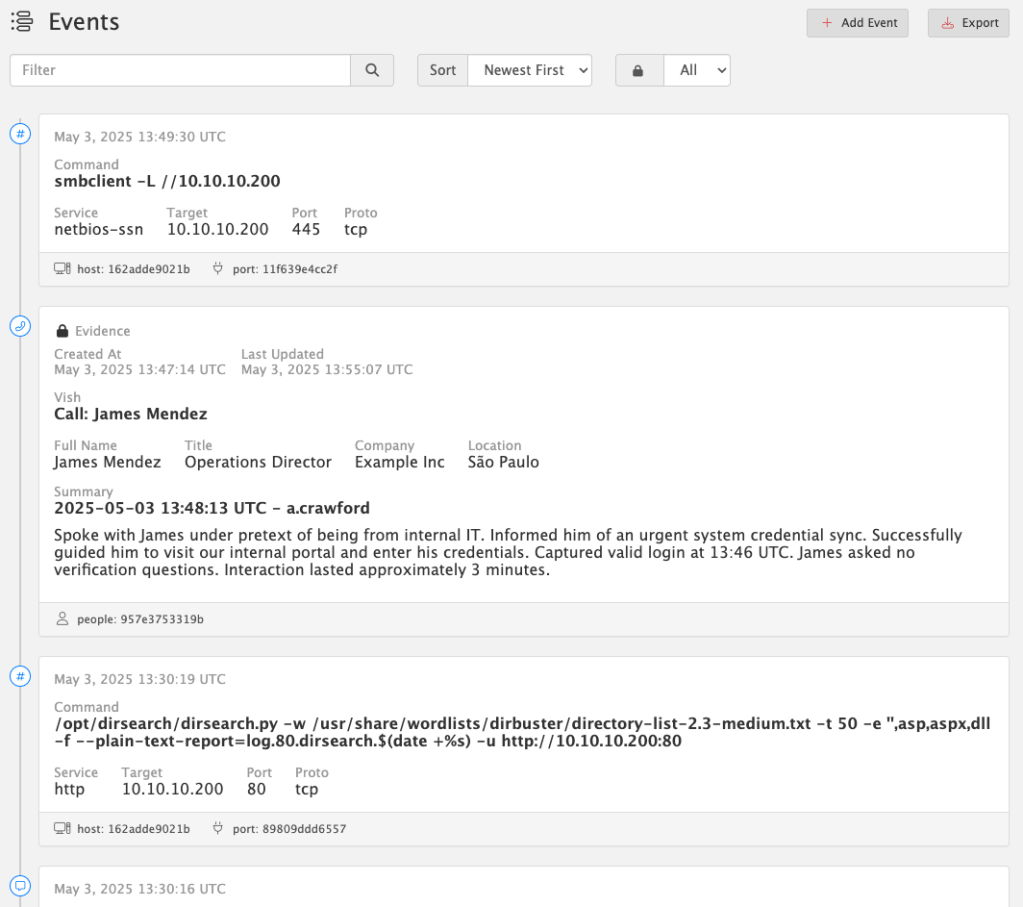
Every op leaves behind a trail of actions, commands, and interactions. Now you can see them all – organized, timestamped, and linked – in the new Events Timeline.
The Events Timeline tracks everything you do across:
Hosts
Services
People
Detections
Social Engineering interactions
Quickly log any event with built-in shortcuts – like when you vish a target, phish credentials, or run a tool. Just click “Add Event” to capture everything: summary, metadata, related objects, and context.
Better yet: every time you launch a command from the Service Command Library (via Copy Command in Hosts or Services), an event is automatically created and linked to the relevant host or port. No extra clicks, no forgotten steps.
All events are UTC timestamped to simplify cross-system correlation.
🔒 Evidence Locking
When an event becomes critical to your story, tag it as Evidence. From that moment on, it’s immutable – locked from edits or deletion – to preserve the integrity of your timeline and findings. This ensures you have a defensible, auditable chain of actions tied directly to your report.
Available now in Pro Tier. Build a real timeline. Back it with real evidence.
Report Engine Update
Breaking Change: Report Template Syntax Update
PenTest.WS now uses {{ and }} as the default delimiters for report template commands, replacing the previous { and } syntax.

This update improves compatibility with more complex templating scenarios.

If you maintain custom report templates, you’ll need to update any placeholders like {engagement.name} to {{engagement.name}} to ensure they continue rendering correctly.

Until then, use the "Generate Legacy Report" button to generate reports using the old syntax.
We’ve officially sunset support for LibreOffice in the main report engine. You’ll still find “Generate Legacy Report” available for now, but moving forward, all reports are optimized for Microsoft Word (.docx).
This change was made to ensure full compatibility with embedded HTML content – like rich text from summaries, notes, and evidence fields – which LibreOffice often struggles to handle cleanly. Over the years, these issues have created friction for users and undermined the reliability of the reporting experience.
Our focus is on stability and precision, especially for users generating formal deliverables. Supporting LibreOffice was a well-intentioned effort to reduce cost barriers, but ultimately, Word is the only platform that consistently handles the full range of features we support.
This update applies to all tiers: Free, Hobby, and Pro.
Defenders, Meet Your New Ally
PenTest.WS is built for red teams. ChallengeWord is built for blue.
Social engineering remains one of the most effective attack vectors. While technical defenses are essential, empowering your team to verify identities in real time is just as critical.
ChallengeWord introduces a human-centric layer of security by providing your team with a rotating, shared secret word, on-demand. It gives employees a discreet, low-friction way to confirm the legitimacy of unexpected calls, texts, or in-person interactions, without confrontation.
By integrating ChallengeWord into your security protocol, you equip your team to:
Quickly identify impersonators attempting to breach your organization.
Enhance existing training with a practical, real-time verification tool.
Reduce the risk of falling victim to vishing, smishing, and other social engineering tactics.
It’s a straightforward solution to a complex problem, designed to bolster your organization’s human firewall.
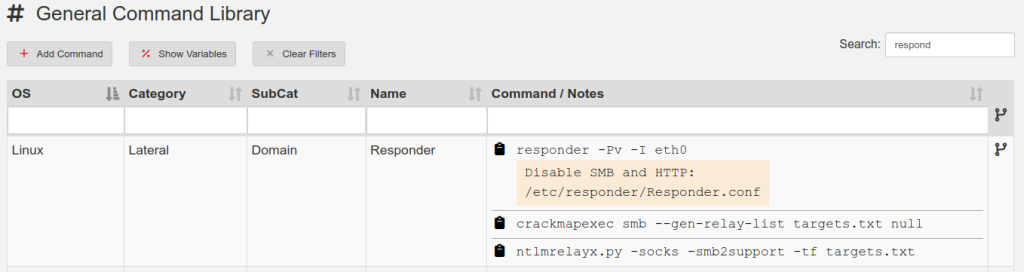
PenTest.WS v2.2 includes a new collaboration tool called Community Repo where you’ll find command templates for everything from PowerShell and Bash commands to BloodHound custom queries. Also, your General Command Library gets a new super power with the Multi-Step Commands feature.
Community Repo: Commands
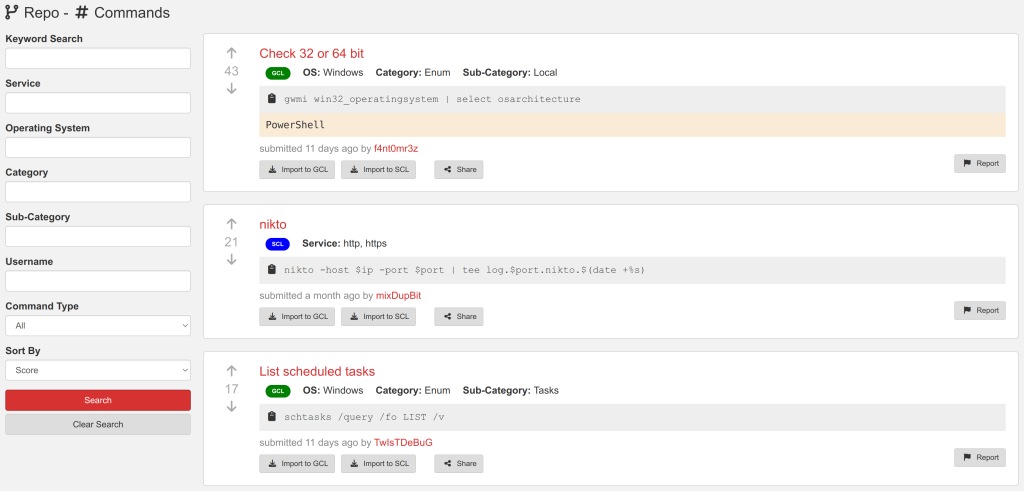
Search by keyword, operating system, category, or service and you’re one click away from importing community repo commands into your General Command Library (GCL) or your Service Command Library (SCL). Be sure to up vote the commands you find helpful, clever, or inspiring.
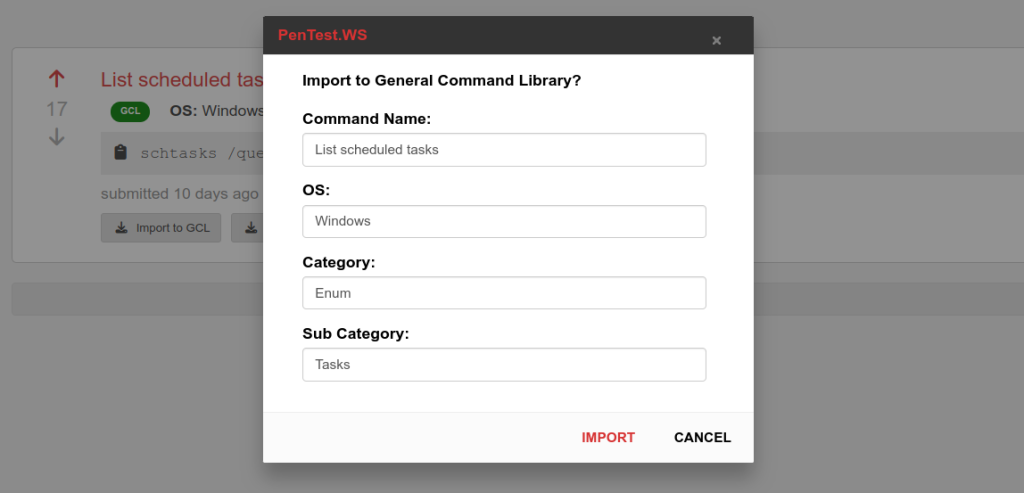
Clicking either the “Import to GCL” or “Import to SCL” buttons brings up a window where you can make any necessary changes to the command’s metadata before its pulled into your account. For GCL, this lets you update the category and sub category to match your own category names.
Show Off Your Awesome Commands
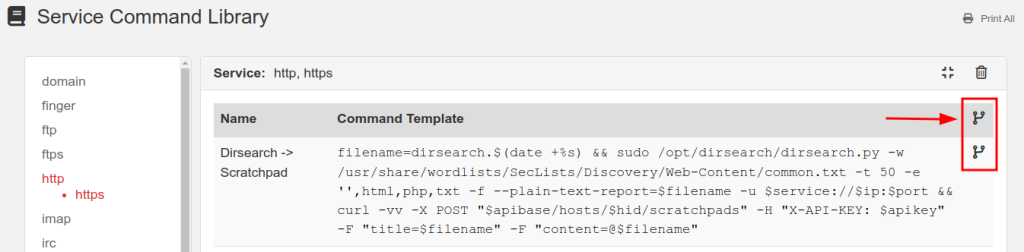
Contribute to the Community Repo from either your GCL or SCL using the highlighted icons below:
Submit individual commands one at a time, or as a group of commands all in one batch. Once submitted, you can no longer make modifications to the command in the repo. However, you can still make changes to your own GCL or SCL version of the commands.
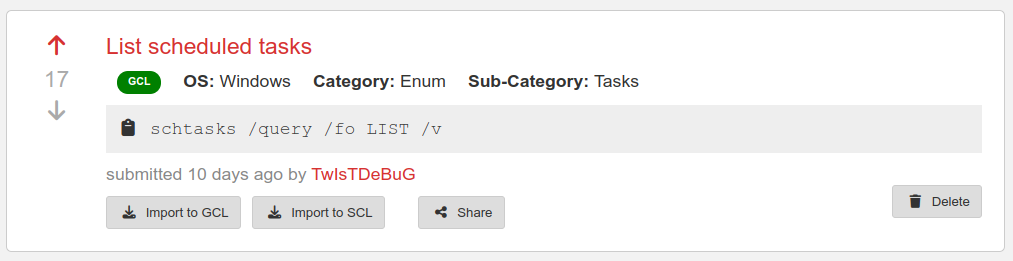
Need to remove a command from the repo? Find your command in the repo and click the Delete button (only available on commands you’ve submitted).
Sharing a direct link to a repo command is easy with the Share button. This generates a link you can send to your teammates:
The Community Repo requires a Hobby Tier or Pro Tier membership.
Multi-Step Commands
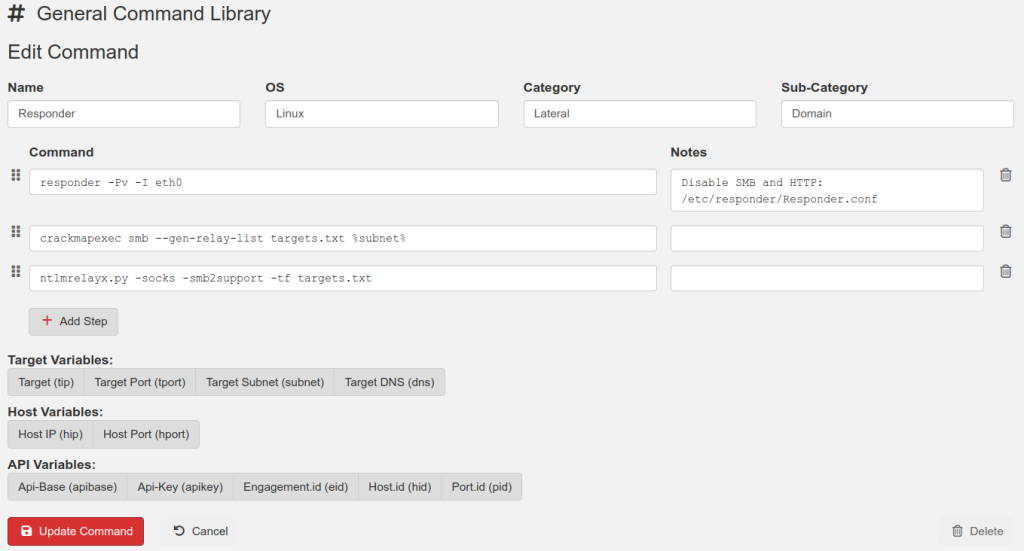
Your General Command Library (GCL) just got a lot more useful with Multi-Step Commands. A single GCL entry can now contain several steps to complete a task. Each step includes its own copy-paste shortcut as well as notes about that specific step.
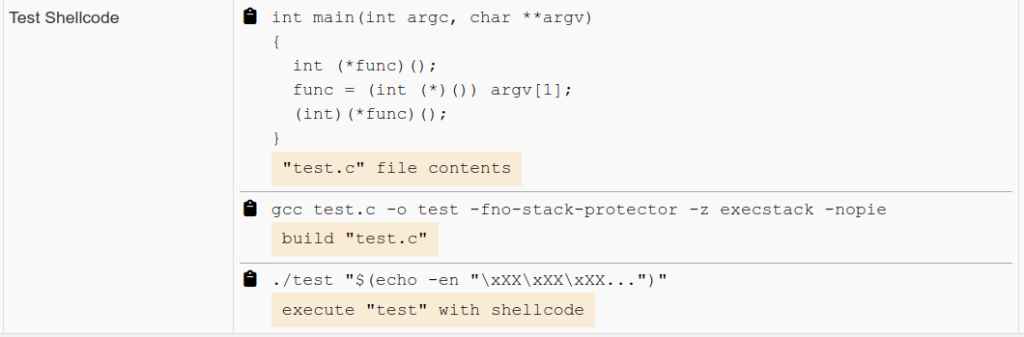
Another useful trick is to group information and commands related to each other into a single GCL entry. For example, Step #1 of the following multi-step command contains C source code for a shellcode testing program. Step #2 builds the executable and Step #3 executes the test program.
More good news, the Community Repo supports importing and exporting of Multi-Step Commands!
Multi-Step Commands are now available to all tier members.
More Version 2.2 Upgrades
Matrix – Copy Targets Quickly generate a “WebServers.txt” targets file using the Matrix. Filter down your list of hosts, for example those with port 80/443 open, and click the “Copy Targets” button in the toolbar. Paste this content into a file to be used with tools such as Nmap or GoWitness.
API Upgrades:
Findings Library now included
Boards now included
Field lengths are now validated
Adjustable Sidebar The sidebar’s width is now adjustable
PenTest.WS v2.1 brings the much anticipated Large Engagements capability to Pro Tier, supporting Engagements with thousands, or tens of thousands of Hosts in a single Engagement. Additionally, Hobby Tier receives the new General Notes Library!
Large Engagements – Pro Tier
With Pro Tier’s new Large Engagement support, a single Engagement can easily handle thousands, or tens of thousands of Hosts. Need to import an Nmap scan of a /20 network? An entire Class B network? No problem.
Several systems have been updated in Pro Tier to work with such large network ranges:
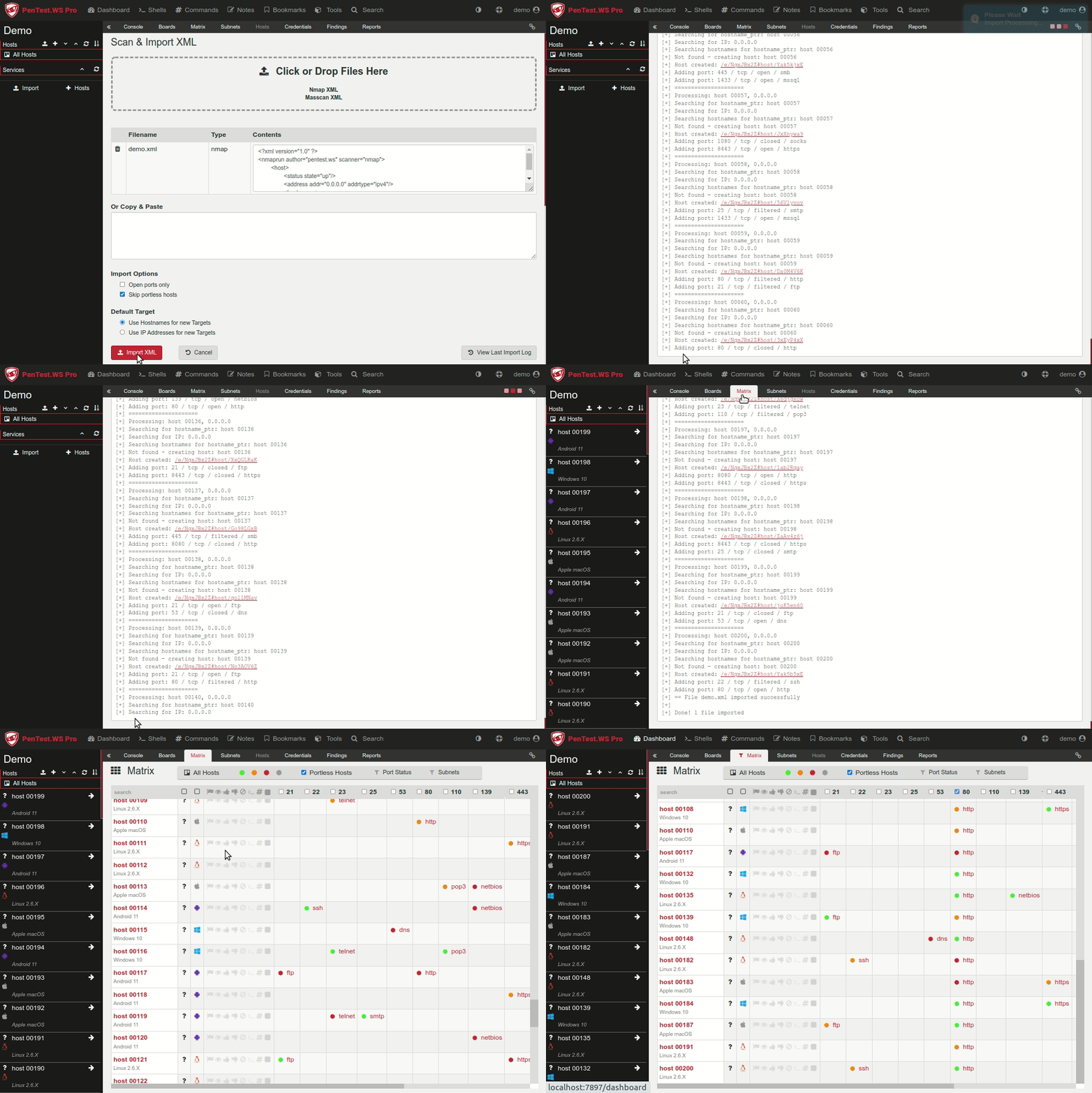
Import XML – the import routine now shows it’s progress log in real time, giving you live feedback of the Hosts & Ports the system is either creating or updating as it works its way through your XML file.
Infinite Scrolling – the application now implements infinite scrolling, only loading enough Hosts to fill the page. As you scroll through various lists, more Hosts are loaded in the background until all Hosts are displayed. The affected systems are:
Application’s Main Sidebar
Boards
Matrix
Subnets
Updated Matrix – filtering by operating system, flags, ports or keywords now effects all Host list queries for a faster and more intuitive user experience. Looking for systems with port 80 or 443 running Linux? Set your Matrix and the Sidebar, Boards & Subnets screens will also be filtered.
Boards – combined with the Matrix, you can create boards such as “Web Servers” and easily move all of your port 80/443 Hosts. Want to break up 4,094 Hosts into ten Boards? Use the “Auto Distribute” feature, now compatible with Infinite Scrolling.
Subnets – using the web servers example we’ve been discussing, jump over to the Subnets screen and copy the “IPs – One Per Line” field into a file for EyeWitness and speed up your recon.
Note: the Large Engagement mod is only available in Pro Tier’s stand-alone application and is not available through our online platform at https://pentest.ws
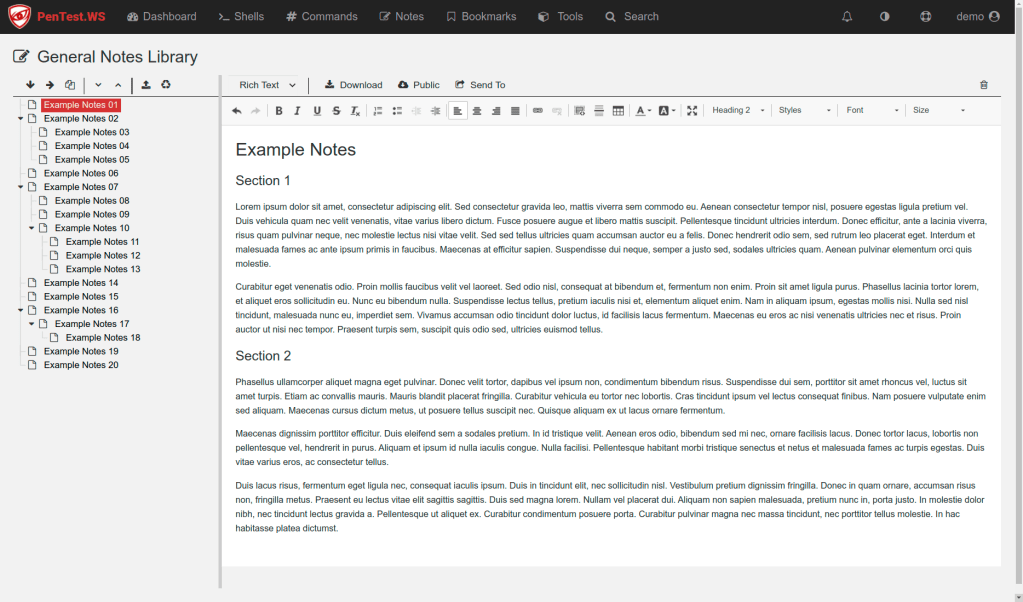
General Notes Library
All the functionality of Scratchpad, but for general notes not specifically related to a Host:
Code editing with syntax highlighting for over 150 programming languages.
Hierarchical file structure with drag-and-drop.
Download files through the browser or using wget/curl/downloadstring.
Instantly switch between code & rich text editing.
Import CherryTree XML files!
Your new General Notes Library is a great place to store your favorite pieces of C# code, common or rarely used procedural steps, or your exciting new research ideas and references. General Notes are linked to your account and not associated with an Engagement.
General Notes Library is available on Hobby Tier and Pro Tier, with limited access from Free Tier.
New Credential Fields Credential records now have “domain” and “notes” fields
Ignore-Cert Pro Tier has a new command line option “–ignore-cert” which allows the stand-alone application to function behind an HTTPS inspection proxy
Welcome to PenTest.WS Version 2.0! Our biggest update yet with the all new Findings System, DOCX Based Reporting Templates, Boards & The Matrix, Full Featured API and Shared Engagements in Pro Tier. Lots to cover, lets dig into it.
Findings System & Findings Library
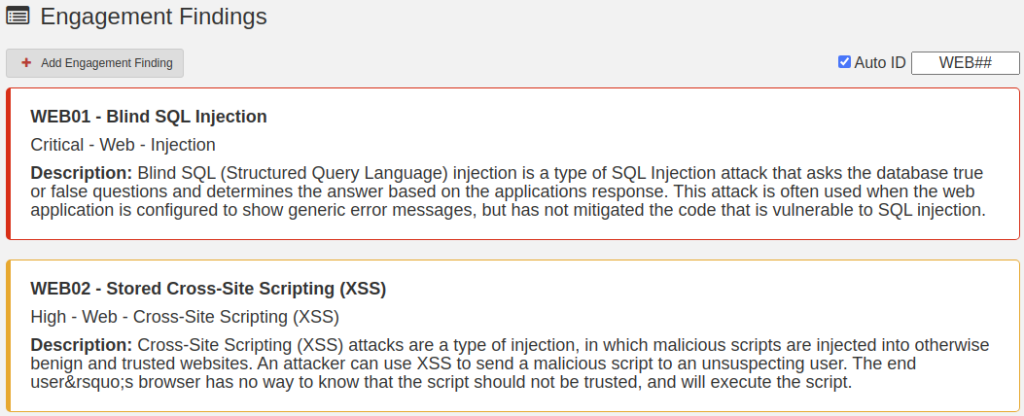
During a security assessment we often discover vulnerabilities in web applications, network infrastructure, and active directory environments, generally called Findings. These issues need to be documented and later reported back to the client for remediation. The new Findings System in PenTest.WS aims to make this process of collection & documentation as easy as possible.
PTWS now contains a user-defined Findings Library where users can build documentation templates for vulnerabilities such as SQL Injection and add generic text for background information, descriptions, impact, recommendations, as well as a default risk level and reference links. During a live security assessment, these findings templates can quickly be added to the engagement in real-time as you discover them. Further refinements can then be captured with unique details about each specific finding.
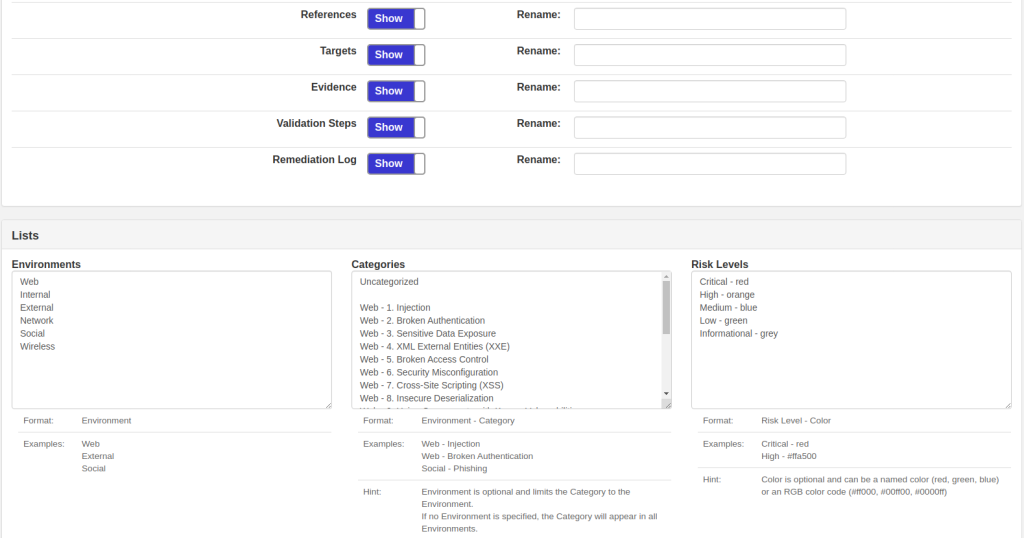
Don’t need to capture Validation Steps or track a Remediation Log? Simply visit the Findings Admin utility and hide these fields. Want to rename the References field to External Links? No problem. Add/remove environments and categories. You can even change the color of your Risk Levels!
Free Tier: no access to Findings System.
Hobby Tier: limited to 5 Findings per Engagement. Findings Library is attached to a single user.
Pro Tier: unlimited. Findings Library is global in Pro Tier.
DOCX Based Reporting Templates
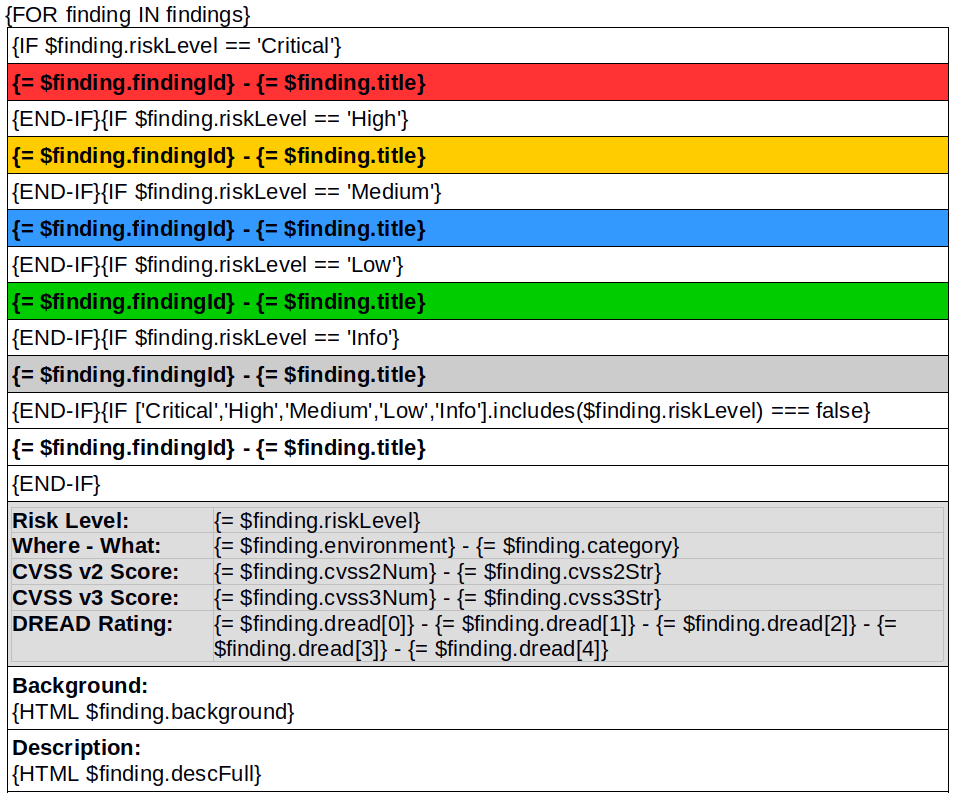
Now that you have collected an impressive set of findings for your client, you need to build a client deliverable document with these details. PenTest.WS’s new Reporting Module processes user-uploaded DOCX files with embedded {tags} to generate fully customized reporting documents with a single click.
As shown in the screenshot above, the Reporting Module’s capabilities includes For loops, If statements, and HTML content from your Findings entries including embedded images like screenshots for evidence. Using the new Client Manager you can add tags such as {client.name} and {client.shortName}, its just one less thing you need to fill out in the final report. Once the Reporting Module is finished processing, your browser downloads the new DOCX file where you can further customize the report as needed.
Free Tier: no access to Reporting Module
Hobby Tier: limited to 2 reporting templates. Reporting Templates are attached to a single user.
Pro Tier: unlimited. Reporting Templates are global in Pro Tier.
Shared Engagements – Pro Tier
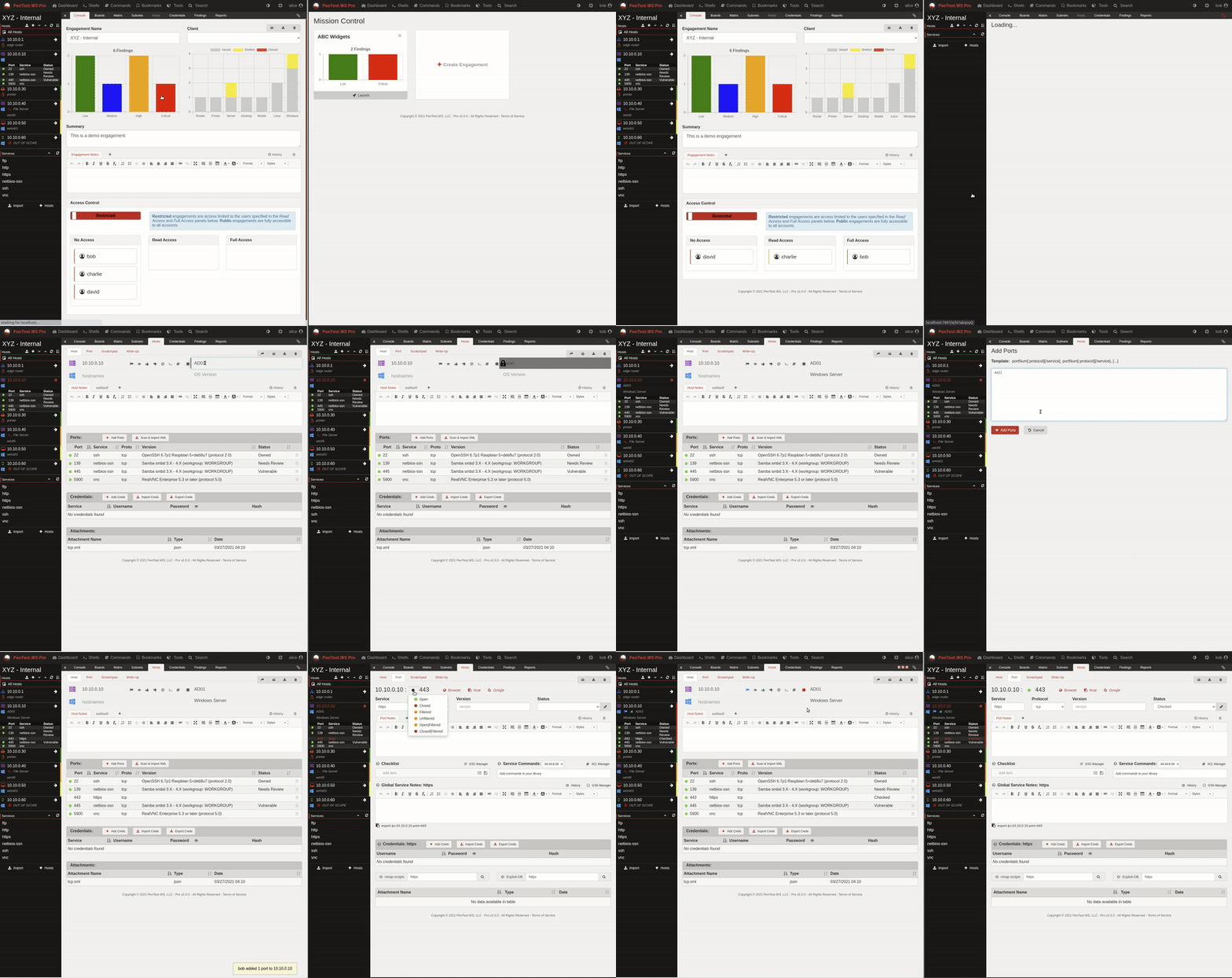
Left Side: user Alice – Right Side: user Bob
One of our most advanced features to-date, today we’re launching Shared Engagements for Pro Tier.
Note: Shared Engagements is available in Pro Tier running in Intranet Mode for multi-user accounts
As the owner of an Engagement (the user who created the Engagement), you can grant Read Only or Full Access to your PTWS teammates on an individual basis. These Shared Engagements appear on the remote user’s Dashboard under a new Team Missions section.
Alternatively, you can choose to make an Engagement Public, granting full access to all teammates. Engagements default to Restricted Access with all teammates in the No Access bucket. An Engagement’s Access Control is available in the Console tab.
All Shared Engagement details are synchronized in real-time between users. Shown in the example above, fields are temporarily locked while being edited and updated as that data is saved to the server. Pop-up notifications are displayed about important events, such as adding/delete hosts, ports, credentials or findings.
Boards (see below) is a shared environment when working with teammates, allowing you to group hosts into logical buckets. The Matrix (also described below) is a personal filter system in Shared Engagements, so you can focus on your interesting targets without affecting the filters of others.
Working on a specific Subnet (Pro Tier only)? Click the filter column in the Subnets tab, or use The Matrix subnet filter. Subnet filtering is also a personal filter system in Shared Engagements.
Pro Tier v2.0 Bottom Line: Using all the new PTWS v2.0 features:
Teammates can work through an engagement together, adding notes & status to hosts & ports along the way
Everyone stays informed and duplicate work is minimized
When a vulnerability is found, use the Findings Library to instantly bring in all the generic text
Immediately add screenshots to the Finding’s Evidence
Use the Reporting Module to generate your client deliverable with one click
Project Done!
Boards
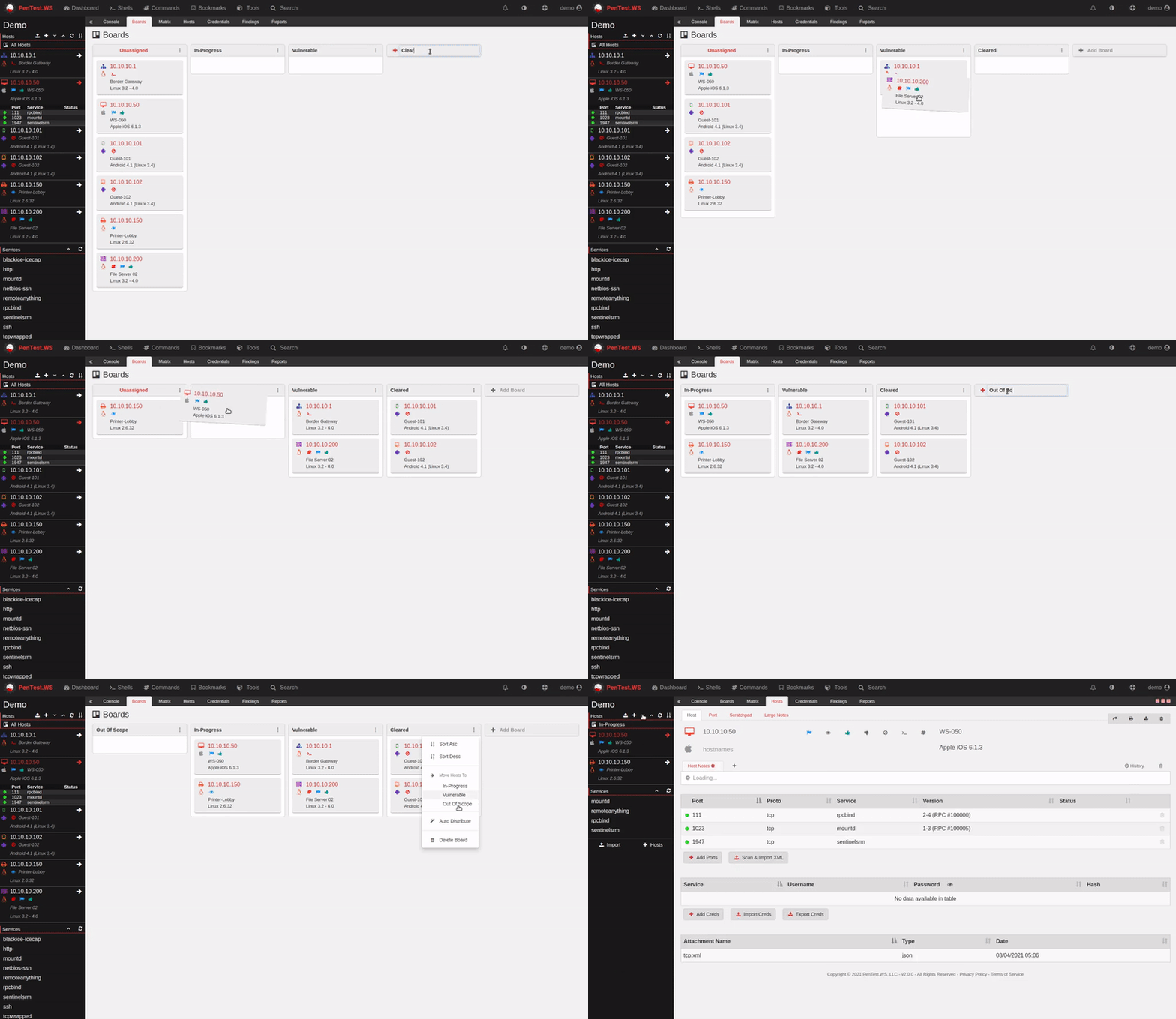
Most of us are familiar with Boards style organization. These boards are user-defined for each Engagement and can contain any number of hosts. Sort each Board and the Hosts using this intuitive drag-and-drop interface. Group your hosts however is most effective for your environment:
Status (in-progress, vulnerable, cleared)
Environments (web, int/ext, s.e., wifi)
AD Domains (us, europe, asia)
Phases (group1, group2, group3)
Once you have defined your Boards, use the Board Filter in the sidebar to limit your view to a selected Board. During a Shared Engagement (Pro Tier) this is a great way to designate different targets to different pen testers. Playing HackTheBox? Setup your Boards for Active Testing, Pwned, Archived, the possibilities are endless.
Boards is available on all tiers
The Matrix
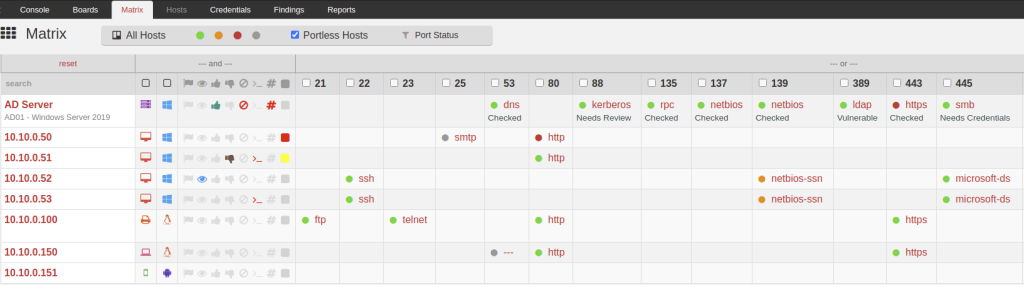
The Matrix gives you a 10,000 foot view of your entire Engagement, broken down by Host & Port. An extensive filtering system is available to narrow your view by OS, Host Type, Host Flags (including the new Color flag), Port Number/State/Status, all integrated with the Boards system.
As you refine your filters in The Matrix, your sidebar will synchronize so you can delve into the selected hosts and quickly jump between your active targets. During a Shared Engagement in Pro Tier, The Matrix is a personal view, allowing different teammates to focus on their own objectives.
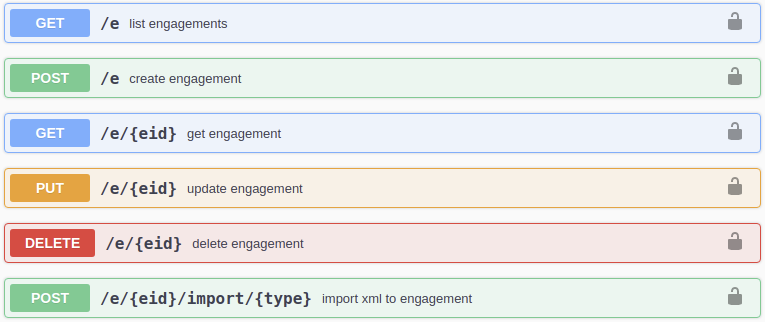
The new PTWS API provides access to your Engagements, Hosts, Ports, Scratchpad, Note Pages, Credentials, Clients & Findings through a RESTful architecture, including GET, PUT, POST, & DELETE capabilities for each object. You can now build automation scripts and integrate external tools into your PenTest.WS environment.
Scanning hosts and importing results now becomes a one-click operation!
The first half of this command runs a typical nmap scan on a target IP address, IP range or CIDR block, then outputs the results to a file called “tcp.xml”. The second half of this command uses curl to immediately post these results to your engagement in PenTest.WS.
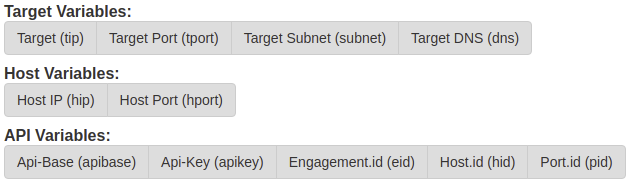
Embedded in this command are several interesting variables:
%tip%
Target IP Address, Range or CIDR Block
%eid%
Current Engagement ID
%apikey%
Your API Key – when you click on a command with this variable, the application will prompt for your password before swapping the variable for your API Key. You can view your API key at https://pentest.ws/settings/api-key
The full list of variables are available in the Edit Templates screens:
PenTest.WS API is available on all tiers
A Few More Things…
Engagement wide Credentials Tab – attach a credential to an Engagement, not just a Host/Port
Host Colors – a visual way to mark interesting Hosts
Old Reporting Tab is now Write-Up – this data is now search from Keyword Search
Service Command Library: Service aliases such as “http, https” in the Service Name field
Pro Tier: LDAP & SMTP Integration
We’ll cover some of these additional features in another post.
Data Status Indicators for added reliability & Two-Factor Authentication Backup Codes for enhanced security!
Data Status Indicators
Data Status Indicators
The PenTest.WS platform automatically saves your data so you can focus on investigating your targets. Until now, this process remained completely in the background leaving you with little indication that your data is safe, stored securely in the cloud.
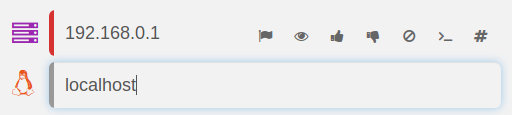
Version 1.9.0 introduces transparency into the save process with Data Status Indicators. As seen in the image above, each auto-save field now has an independent status indicator along its left edge:
While actively editing an auto-save field, this indicator will turn grey
During the auto-save process, it will turn red
Once the save process is complete, the indicator will disappear
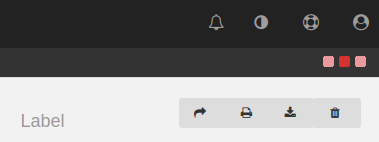
In addition to the individual field indicators, there is a new general data transfer indicator in the top right corner:
Data Transfer Indicator
Whenever PenTest.WS is sending or receiving data, this new data transfer indicator, with its animated three red squares, will provide further insight into the status of your valuable information.
2FA Backup Codes
Two-Factor Authentication Backup Codes
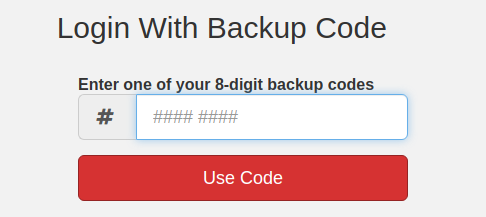
Accidents happen. Phones are lost, upgraded or simply fail. Backup codes are essential to recovering your account when two-factor authentication (2FA) is enabled.
If you already have 2FA enabled, the system will generate your new backup codes when you visit the link above. Otherwise, you will be prompted to enable two-factor authentication, a process which greatly enhances the security of your PTWS account.
Using a Backup Code
You can only use each backup code once. Be sure to keep these backup codes somewhere safe but accessible.
When all ten codes have been used, you’ll need to generate a new set by revisiting the link above. This link is available from your Account Settings page in the 2FA section. You can generate new codes at any time, which will invalidate all existing backup codes.
Version 2.0 is a big milestone for any application and one we are incredibly excited about. Today we are announcing two of the most anticipated features coming to PTWS in 2021.
New Report Writing Engine
With all professional penetration tests, the client deliverable is naturally a report describing the engagement’s findings and remediation recommendations. This can be a tedious and time consuming effort, one that is often repetitive and prone to mistakes.
PTWS v2 allows the tester to collect relevant information during a live penetration test and easily generate an engagement report at its conclusion. Report templates start as a Word Document and are fully customizable with loops and conditional statements. Finally, a new data merged Word Document is generated, allowing you to further refine the report as needed.
Application Programming Interface (API)
Scripting is a big part of efficient hacking, so we’re giving PTWS its very own API. Using a simple but effective REST interface which speaks JSON, you’ll be able to build custom tooling around common tasks:
Import Nmap and Masscan XML files
Query Engagement, Host and Port records
Add Hosts and Ports to an Engagement
Upload and Download Scratchpad Documents
We’re looking forward to seeing what our hacker community can do with a PenTest.WS API to improve their workflow.
Multiple files, masscan, bookmarks, print… lets dig into what’s new in version 1.8.3
Multi-File Import
Multi-File Import
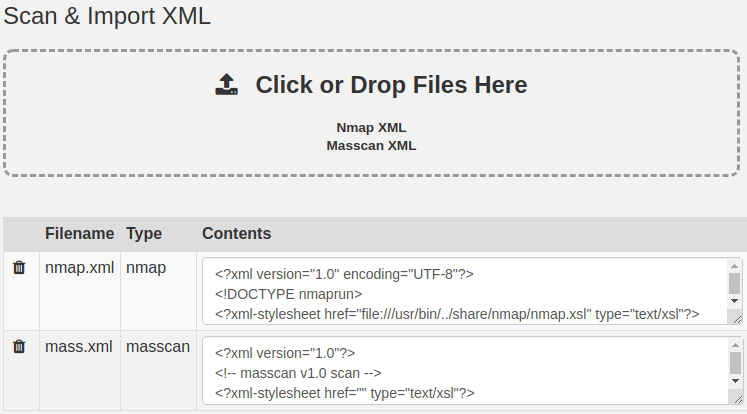
Importing several XML files just got a lot easier! You can now load multiple XML files at once, either through the file browser or simply drag-and-drop. Data from each host always gets placed where it belongs. The filename, file type and contents are displayed for each file. Delete as needed, or click the “Import XML” button to run your import. v1.8.2 brought us the Import Log which has been updated to support multiple files.
Masscan Support
Import now supports Masscan XML files. The Import routine also supports a mixture of Nmap files and Masscan files in the same batch. Have a large IP space to scan? Run a fast Masscan first and follow up discovered hosts with a detailed Nmap scan.
Bookmark Library
Bookmark Library
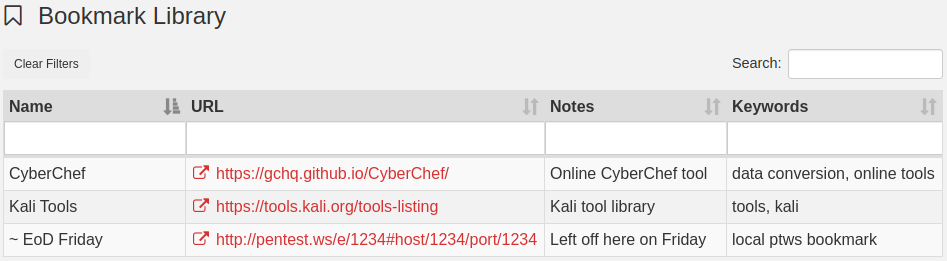
Store your security related bookmarks all in one place with the new Bookmark Library. Add notes and assign keywords for easy retrieval later using filters, sort and search. You can also store local PenTest.WS links. Bookmark where you left an engagement Friday night and easily pick back up Monday morning.
Print Engagements, Hosts & Ports
v1.8.3 adds a Print functionality to the online Free and Hobby Tiers. Its an easy way to view all you data on a single page. Look for the printer icon in the upper right corner of the Console, Host and Port pages.
Misc Improvements & Bug Fixes
Double Paste Bug – A long time coming, but the double paste bug in the Notes fields has been fixed!
Venom Builder – Additional Parameters – The Venom Builder tool now has a free-type field called Additional Parameters.
Hash Type for Credentials – Credentials now include a Hash Type field, used later to identify what hashcat mode you might need.
Maximize Notes Fields – got lots of notes? Now there is a Maximize button on all Notes fields.
What’s Next?
We have version 2.0 in our sights, which brings an incredible number of new features and capabilities. But more on that as we get closer.
The next major release of PenTest.WS, version 1.9.0, has a completely rewritten save mechanism. Beyond bringing more reliability to the platform, the aim is to provide more transparency into the state of your data. As fields are updated and auto-save timers are set, clear indications of this process will be visible in the user interface.
Many of the improvements in v1.8.3 came directly from user requests. Head over to the Support Forums and submit a Feature Request with your ideas!