We’re excited to drop a massive quality-of-life upgrade in version 2.4 — one that reflects how professional red teams actually operate. Here’s what’s new:
🧭 Pro Tier: Engagements Replace the Dashboard
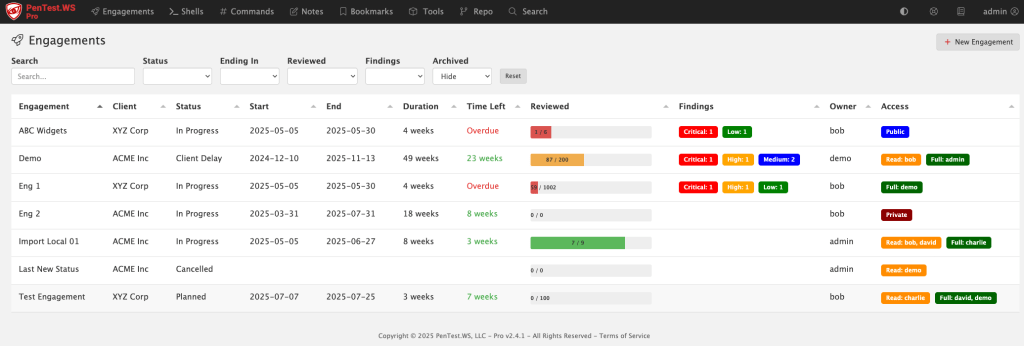
The old dashboard was built around shells and rooting boxes — but that’s not how pros manage a real engagement. We’ve replaced it with the new Engagements screen, purpose-built for tracking scope, timelines, findings, and more.
🛡️ New Global Findings View (All Tiers)
Free, Hobby, and Pro users now get access to a consolidated Findings screen. It gives you a sortable, filterable view across engagements, sorted by risk, category, or environment.
📅 Engagements Now Have Planning Metadata
Engagements now include Status, Start Date, and End Date fields — all of which are user-configurable and filterable. You can use this for planning, tracking, or just keeping your team organized.
🧪 Matrix Filters for Hosts and Ports
Tired of binary filters? The new triple-filter switch gives you full control: filter for “Yes”, filter for “No”, or don’t filter at all. It’s more intuitive, especially when tracking host review status and port exposure.
💻 Pro On-Premise – HTTP Log View
If you’re running Pro on-premise, you’ll now see an HTTP access log printed directly in your terminal. It’s great for troubleshooting or just keeping an eye on what’s happening under the hood.
🛠️ Admin Control Over Status Field (Pro)
The new status field isn’t hardcoded — it’s company-wide and admin-configurable in the Pro Tier admin panel.
🧠 Smart CIDR Expansion
Adding hosts via CIDR just got easier. If you paste in a range (like 192.168.0.1/24), you’ll be prompted to automatically expand it into individual IPs. (IPv4 only.)
✅ Support System Overhaul
Some support tickets were falling into the void (thanks, spam filters and silent failures). We’ve rebuilt our support system behind the scenes and are actively monitoring the system.
If you’re on Hobby or Free Tier and want access to the new Engagements screen, now’s the time to check out Pro. We’ve got more in the pipeline — stay tuned.
We just launched PenTest.WS v2.3, and it’s a big one, especially if your red team ops go beyond just scanning ports and popping shells. With this release, we’re giving Pro Tier users new tools to track and understand the people behind the infrastructure. Because sometimes the weakest link isn’t a host, it’s a human.
People Hacking
Social engineering is more than just an attack vector, it’s a workflow. And now you can track it like one.
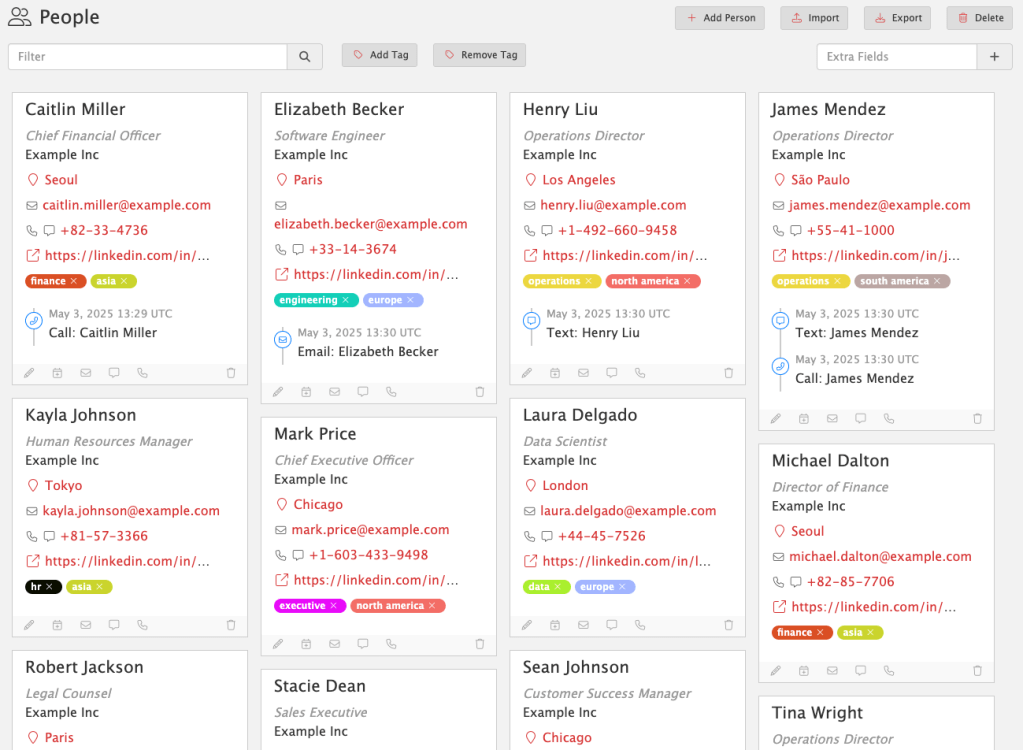
People Hacking gives you a dedicated space to track social engineering targets, tactics, and outcomes. Each person is a first-class object, complete with contact details, tags, profile URLs, locations, and communication history.
People Hacking lets you:
Log phone calls, phishing attempts, texts, or in-person interactions
Assign custom tags to track roles, regions, risk levels, or anything else
Link SE engagements directly to findings as supporting evidence
Capture everything in one searchable, structured view
No more scattered notes or one-off spreadsheets. With People Hacking, social engineering becomes a trackable, repeatable part of your red team ops.
Available now in Pro Tier. Because real-world attackers don’t stop at the firewall, and neither should you.
Events Timeline
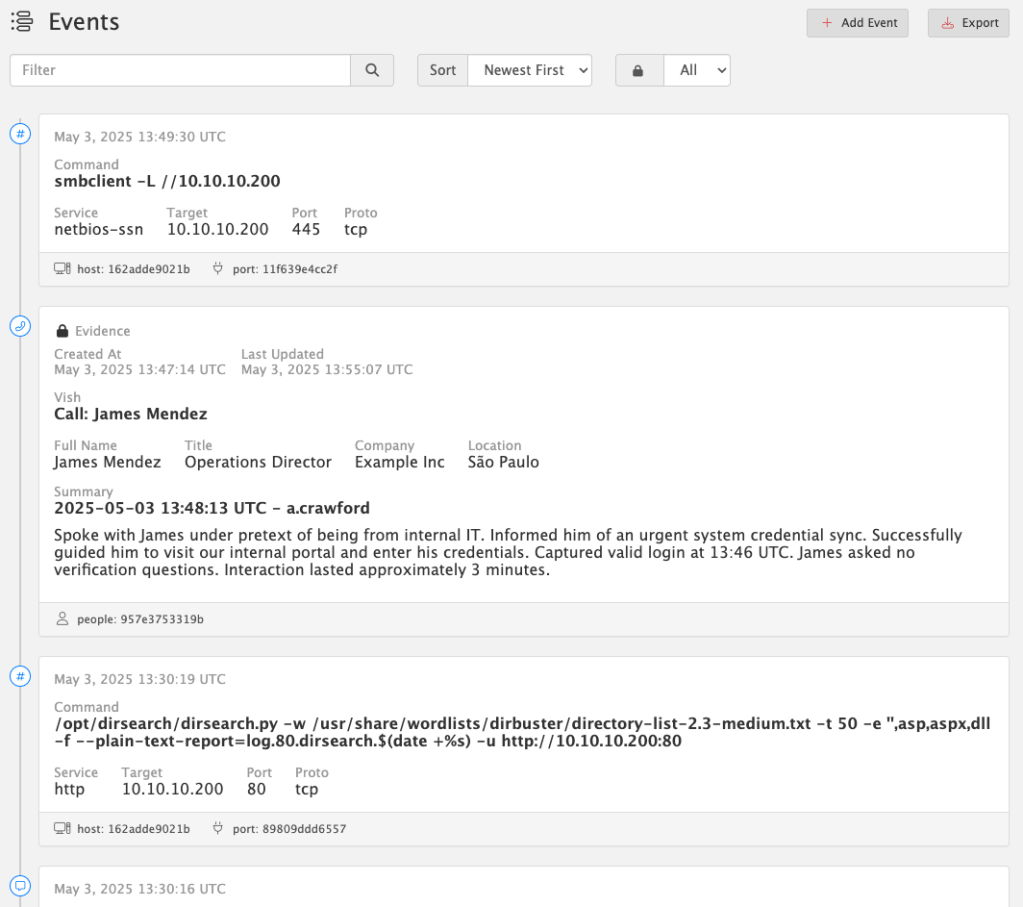
Every op leaves behind a trail of actions, commands, and interactions. Now you can see them all – organized, timestamped, and linked – in the new Events Timeline.
The Events Timeline tracks everything you do across:
Hosts
Services
People
Detections
Social Engineering interactions
Quickly log any event with built-in shortcuts – like when you vish a target, phish credentials, or run a tool. Just click “Add Event” to capture everything: summary, metadata, related objects, and context.
Better yet: every time you launch a command from the Service Command Library (via Copy Command in Hosts or Services), an event is automatically created and linked to the relevant host or port. No extra clicks, no forgotten steps.
All events are UTC timestamped to simplify cross-system correlation.
🔒 Evidence Locking
When an event becomes critical to your story, tag it as Evidence. From that moment on, it’s immutable – locked from edits or deletion – to preserve the integrity of your timeline and findings. This ensures you have a defensible, auditable chain of actions tied directly to your report.
Available now in Pro Tier. Build a real timeline. Back it with real evidence.
Report Engine Update
Breaking Change: Report Template Syntax Update
PenTest.WS now uses {{ and }} as the default delimiters for report template commands, replacing the previous { and } syntax.

This update improves compatibility with more complex templating scenarios.

If you maintain custom report templates, you’ll need to update any placeholders like {engagement.name} to {{engagement.name}} to ensure they continue rendering correctly.

Until then, use the "Generate Legacy Report" button to generate reports using the old syntax.
We’ve officially sunset support for LibreOffice in the main report engine. You’ll still find “Generate Legacy Report” available for now, but moving forward, all reports are optimized for Microsoft Word (.docx).
This change was made to ensure full compatibility with embedded HTML content – like rich text from summaries, notes, and evidence fields – which LibreOffice often struggles to handle cleanly. Over the years, these issues have created friction for users and undermined the reliability of the reporting experience.
Our focus is on stability and precision, especially for users generating formal deliverables. Supporting LibreOffice was a well-intentioned effort to reduce cost barriers, but ultimately, Word is the only platform that consistently handles the full range of features we support.
This update applies to all tiers: Free, Hobby, and Pro.
Defenders, Meet Your New Ally
PenTest.WS is built for red teams. ChallengeWord is built for blue.
Social engineering remains one of the most effective attack vectors. While technical defenses are essential, empowering your team to verify identities in real time is just as critical.
ChallengeWord introduces a human-centric layer of security by providing your team with a rotating, shared secret word, on-demand. It gives employees a discreet, low-friction way to confirm the legitimacy of unexpected calls, texts, or in-person interactions, without confrontation.
By integrating ChallengeWord into your security protocol, you equip your team to:
Quickly identify impersonators attempting to breach your organization.
Enhance existing training with a practical, real-time verification tool.
Reduce the risk of falling victim to vishing, smishing, and other social engineering tactics.
It’s a straightforward solution to a complex problem, designed to bolster your organization’s human firewall.


 PenTest Workshop News