Findings Groups, Reporting Briefs, and File Shares – Version 2.5

Version 2.5 is here, and it comes with three major features that elevate your work inside PenTest.WS — from organizing findings, to building reports, to managing files during engagements.

Findings Groups
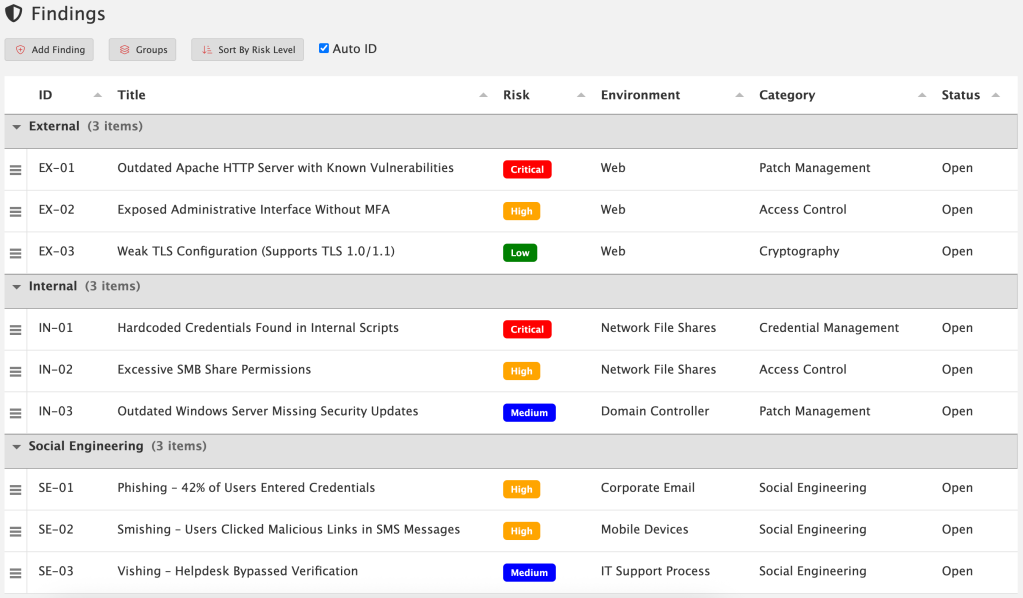
Findings Groups give you a new way to organize your findings inside an engagement. By default, findings are still just a flat list — nothing changes unless you want it to. But Pro Tier members can now create custom groups and drag findings into them.

Want to separate issues by External, Internal, and Social Engineering workstream? Easy! Create groups that match your own workflow, methodology, or reporting style. You’re in control.

These groups carry over directly into reporting, so the structure you set in your engagement automatically shows up in your exported reports. To take advantage of this capability, you’ll need to update your reporting templates with the new grouped fields. Once that’s done, your reports will reflect the same organization you defined during the engagement — resulting in cleaner structure, clearer communication, and less manual sorting later on.

For detailed documentation:

Reporting Briefs

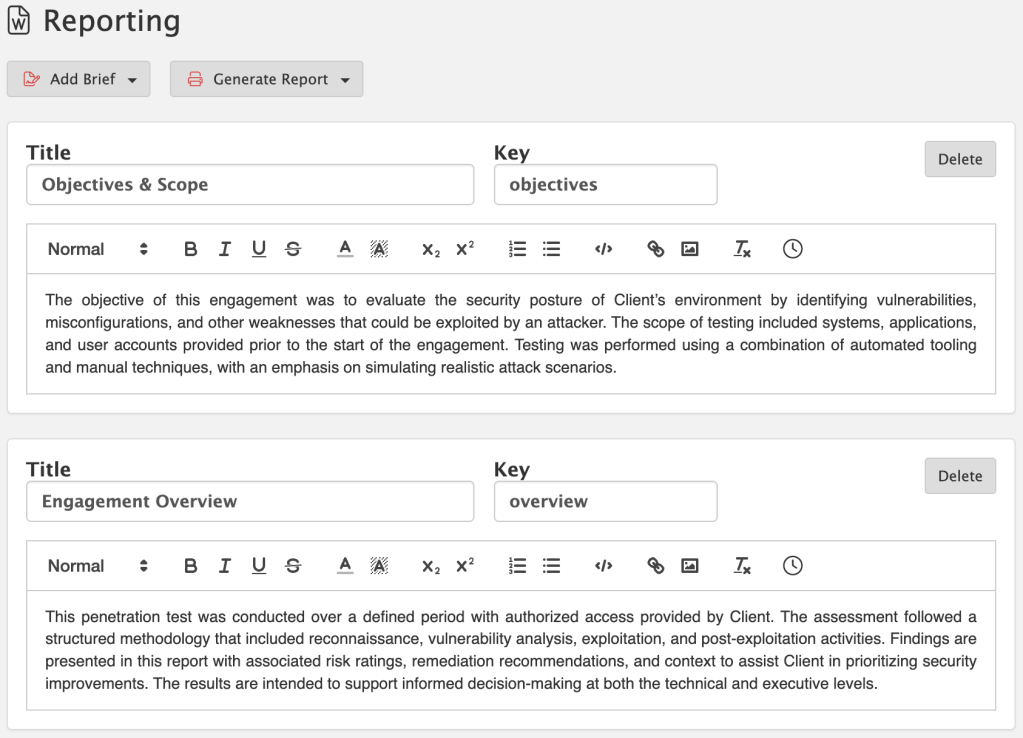
Reports are more than just technical data — they need a narrative. That’s where Reporting Briefs come in. Briefs give you a starting point of reusable content that can be customized for each engagement. Whether it’s a methodology section, an executive summary, or a tailored explanation for C-level readers, you can maintain a library of briefs and then fine-tune them as needed.

This means no more copy-paste from old documents. Your content lives directly inside PenTest.WS, ready to be reused, edited, and adapted whenever you need it.

For detailed documentation:

File Shares (On-Premise Exclusive)

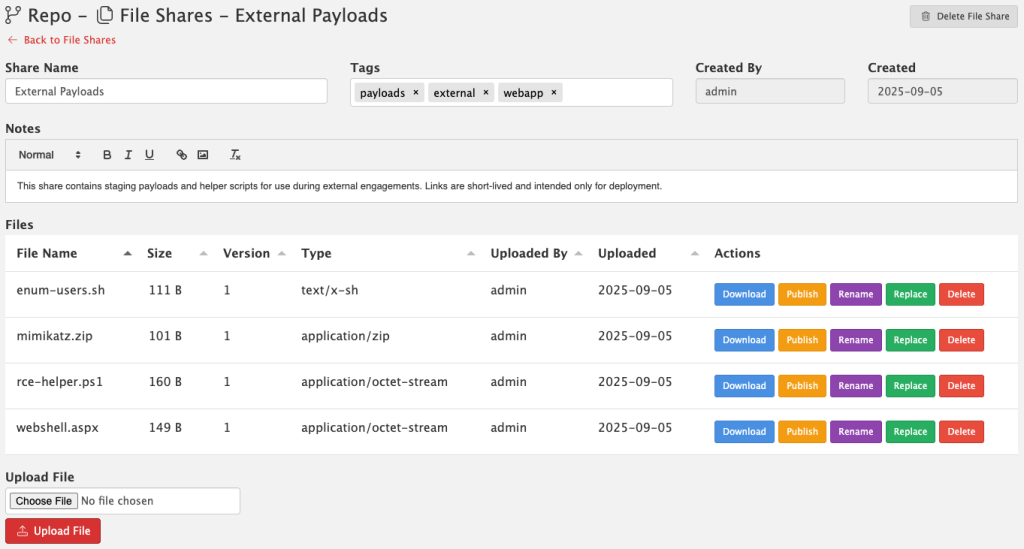
Version 2.5 also introduces File Shares, a brand new way to manage files directly inside PenTest.WS. This feature is built for pentesters who need a secure, team-friendly way to store and share files without relying on third-party services.

  • Secure – Files are stored locally on your server, never uploaded to the cloud.
  • No AV/EDR Scanning – Nothing interferes with your payloads, tools, or artifacts.
  • Versioning Built In – Track file changes over time.
  • Shared With Your Team – Files are available right inside your PenTest.WS workspace, without extra permissions or ACL headaches.

When you need to push files out to a live target during an engagement, File Shares makes it simple. You can generate a short-lived public URL that expires automatically, giving you a safe, temporary way to deploy files without setting up separate hosting. Once the link is gone, so is the exposure.

File Shares is available exclusively in the Pro Tier On-Premise edition of PenTest.WS.

For detailed documentation:

What This Means for You

Version 2.5 isn’t just about new buttons — it’s about making reporting faster, more professional, and more repeatable. With Findings Groups to structure your data, Reporting Briefs to tell the story, and File Shares to manage and deploy files, you’ll spend less time wrangling reports and infrastructure, and more time delivering results.

Ready to take your reporting to the next level? Findings Groups, Reporting Briefs, and File Shares are available now in Pro Tier. File Shares is exclusive to the On-Premise edition. If you’re on Free or Hobby Tier, upgrade today and unlock these new tools built for professional engagements: https://store.pentest.ws/

Thanks for reading!
PenTest.WS Development Team
A New Way to Work – Version 2.4

We’re excited to drop a massive quality-of-life upgrade in version 2.4 — one that reflects how professional red teams actually operate. Here’s what’s new:

🧭 Pro Tier: Engagements Replace the Dashboard

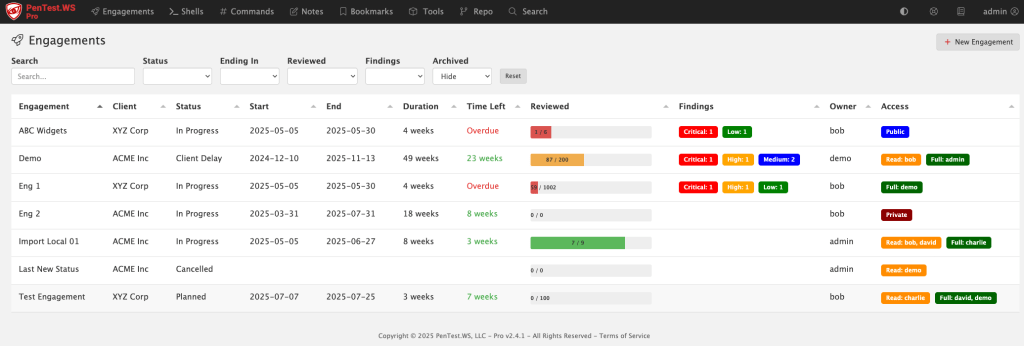
The old dashboard was built around shells and rooting boxes — but that’s not how pros manage a real engagement. We’ve replaced it with the new Engagements screen, purpose-built for tracking scope, timelines, findings, and more.

🛡️ New Global Findings View (All Tiers)

Free, Hobby, and Pro users now get access to a consolidated Findings screen. It gives you a sortable, filterable view across engagements, sorted by risk, category, or environment.

📅 Engagements Now Have Planning Metadata

Engagements now include Status, Start Date, and End Date fields — all of which are user-configurable and filterable. You can use this for planning, tracking, or just keeping your team organized.

🧪 Matrix Filters for Hosts and Ports

Tired of binary filters? The new triple-filter switch gives you full control: filter for “Yes”, filter for “No”, or don’t filter at all. It’s more intuitive, especially when tracking host review status and port exposure.

💻 Pro On-Premise – HTTP Log View

If you’re running Pro on-premise, you’ll now see an HTTP access log printed directly in your terminal. It’s great for troubleshooting or just keeping an eye on what’s happening under the hood.

🛠️ Admin Control Over Status Field (Pro)

The new status field isn’t hardcoded — it’s company-wide and admin-configurable in the Pro Tier admin panel.

🧠 Smart CIDR Expansion

Adding hosts via CIDR just got easier. If you paste in a range (like 192.168.0.1/24), you’ll be prompted to automatically expand it into individual IPs. (IPv4 only.)

Support System Overhaul

Some support tickets were falling into the void (thanks, spam filters and silent failures). We’ve rebuilt our support system behind the scenes and are actively monitoring the system.

If you’re on Hobby or Free Tier and want access to the new Engagements screen, now’s the time to check out Pro. We’ve got more in the pipeline — stay tuned.

Thanks for reading!
PenTest.WS Development Team
The Human Attack Surface – Version 2.3

We just launched PenTest.WS v2.3, and it’s a big one, especially if your red team ops go beyond just scanning ports and popping shells. With this release, we’re giving Pro Tier users new tools to track and understand the people behind the infrastructure. Because sometimes the weakest link isn’t a host, it’s a human.

People Hacking

Social engineering is more than just an attack vector, it’s a workflow. And now you can track it like one.

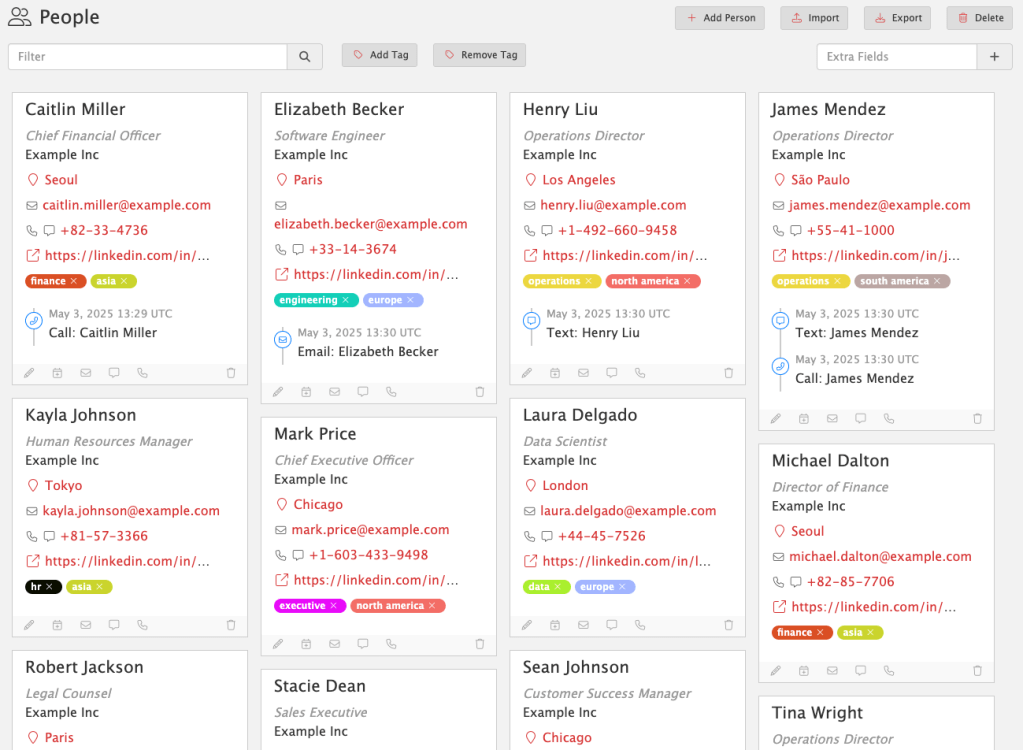
People Hacking gives you a dedicated space to track social engineering targets, tactics, and outcomes. Each person is a first-class object, complete with contact details, tags, profile URLs, locations, and communication history.

People Hacking lets you:

  • Log phone calls, phishing attempts, texts, or in-person interactions
  • Assign custom tags to track roles, regions, risk levels, or anything else
  • Link SE engagements directly to findings as supporting evidence
  • Capture everything in one searchable, structured view

No more scattered notes or one-off spreadsheets. With People Hacking, social engineering becomes a trackable, repeatable part of your red team ops.

For more information, visit the docs:
https://docs.pentest.ws/people-and-events/people-hacking

Available now in Pro Tier. Because real-world attackers don’t stop at the firewall, and neither should you.

Events Timeline

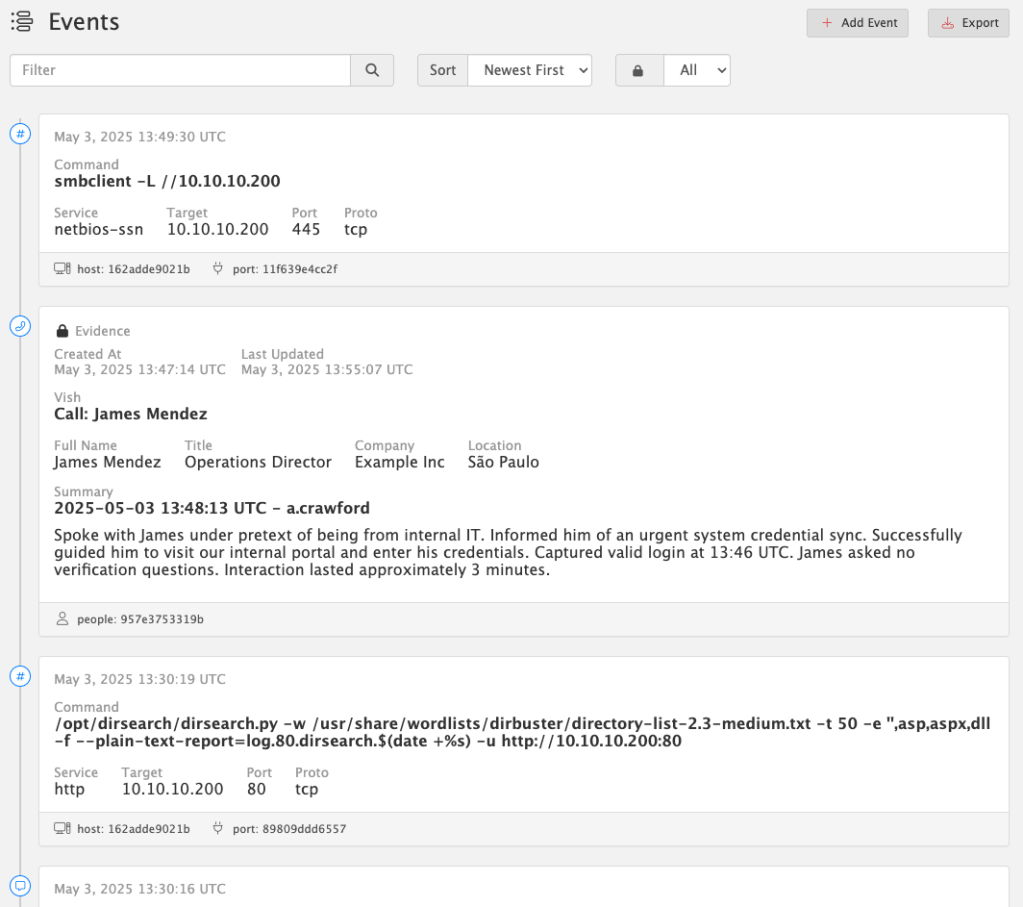
Every op leaves behind a trail of actions, commands, and interactions. Now you can see them all – organized, timestamped, and linked – in the new Events Timeline.

The Events Timeline tracks everything you do across:

  • Hosts
  • Services
  • People
  • Detections
  • Social Engineering interactions

Quickly log any event with built-in shortcuts – like when you vish a target, phish credentials, or run a tool. Just click “Add Event” to capture everything: summary, metadata, related objects, and context.

Better yet: every time you launch a command from the Service Command Library (via Copy Command in Hosts or Services), an event is automatically created and linked to the relevant host or port. No extra clicks, no forgotten steps.

All events are UTC timestamped to simplify cross-system correlation.

🔒 Evidence Locking

When an event becomes critical to your story, tag it as Evidence. From that moment on, it’s immutable – locked from edits or deletion – to preserve the integrity of your timeline and findings. This ensures you have a defensible, auditable chain of actions tied directly to your report.

For more information, visit the docs:
https://docs.pentest.ws/people-and-events/events-timeline

Available now in Pro Tier. Build a real timeline. Back it with real evidence.

Report Engine Update

Breaking Change: Report Template Syntax Update
PenTest.WS now uses {{ and }} as the default delimiters for report template commands, replacing the previous { and } syntax.

This update improves compatibility with more complex templating scenarios.

If you maintain custom report templates, you’ll need to update any placeholders like {engagement.name} to {{engagement.name}} to ensure they continue rendering correctly.

Until then, use the "Generate Legacy Report" button to generate reports using the old syntax.

We’ve officially sunset support for LibreOffice in the main report engine. You’ll still find “Generate Legacy Report” available for now, but moving forward, all reports are optimized for Microsoft Word (.docx).

This change was made to ensure full compatibility with embedded HTML content – like rich text from summaries, notes, and evidence fields – which LibreOffice often struggles to handle cleanly. Over the years, these issues have created friction for users and undermined the reliability of the reporting experience.

Our focus is on stability and precision, especially for users generating formal deliverables. Supporting LibreOffice was a well-intentioned effort to reduce cost barriers, but ultimately, Word is the only platform that consistently handles the full range of features we support.

For an updated Report Template which includes People & Events:
https://docs.pentest.ws/clients-and-reporting/reporting-templates

This update applies to all tiers: Free, Hobby, and Pro.

Defenders, Meet Your New Ally

PenTest.WS is built for red teams. ChallengeWord is built for blue.

Social engineering remains one of the most effective attack vectors. While technical defenses are essential, empowering your team to verify identities in real time is just as critical.

ChallengeWord introduces a human-centric layer of security by providing your team with a rotating, shared secret word, on-demand. It gives employees a discreet, low-friction way to confirm the legitimacy of unexpected calls, texts, or in-person interactions, without confrontation.

By integrating ChallengeWord into your security protocol, you equip your team to:

  • Quickly identify impersonators attempting to breach your organization.
  • Enhance existing training with a practical, real-time verification tool.
  • Reduce the risk of falling victim to vishing, smishing, and other social engineering tactics.

It’s a straightforward solution to a complex problem, designed to bolster your organization’s human firewall.

Learn more about ChallengeWord or request a demo today!

Pro Tier Release

Two years after initial development began on PenTest.WS, today we are officially releasing Pro Tier!

PenTest.WS Pro is an offline stand-alone version of the online web application designed to run directly inside your Kali Linux virtual machine. The Pro Tier was developed for professional penetration testers who must comply with strict non-disclosure agreements or those who operate within a restricted network environment.

Get Pro Tier at store.pentest.ws

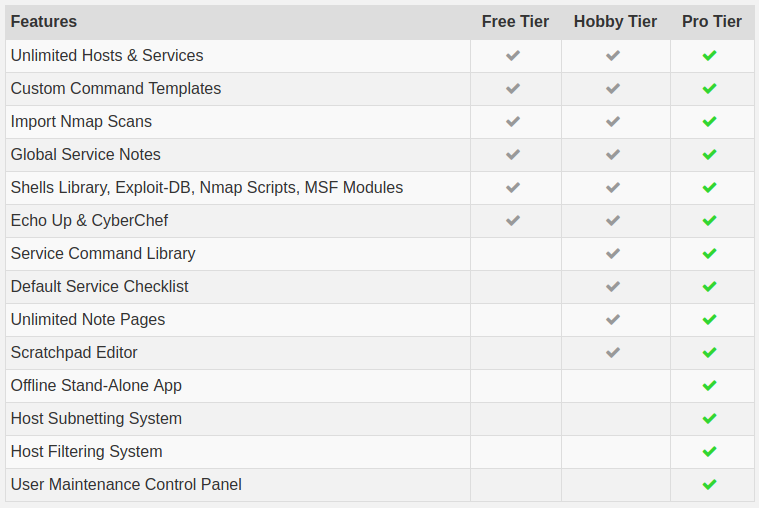
All the benefits of the Hobby Tier, plus:

  • Pro Tier Software Updates
  • Offline Stand-Alone Application
  • Two Modes of Operation:
    • Solo Mode
    • Intranet Mode
  • Host Subnetting System
  • Host Filtering System
  • User Maintenance Control Panel

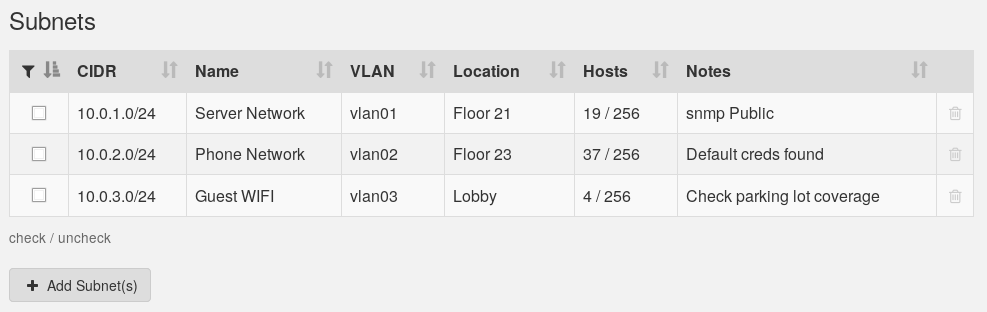
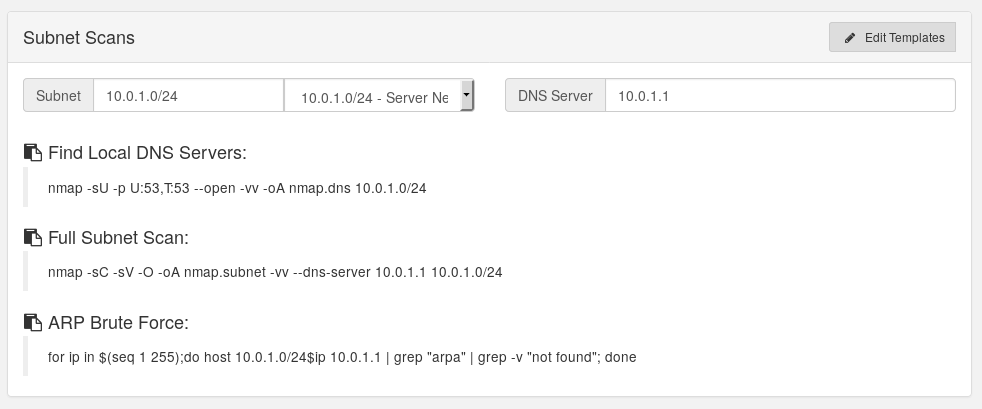
Pro Tier’s subnetting system allows a penetration tester to breakdown a large engagement, maintain scope, and focus on individual segments of a target network.

These subnets can be used in scan templates:

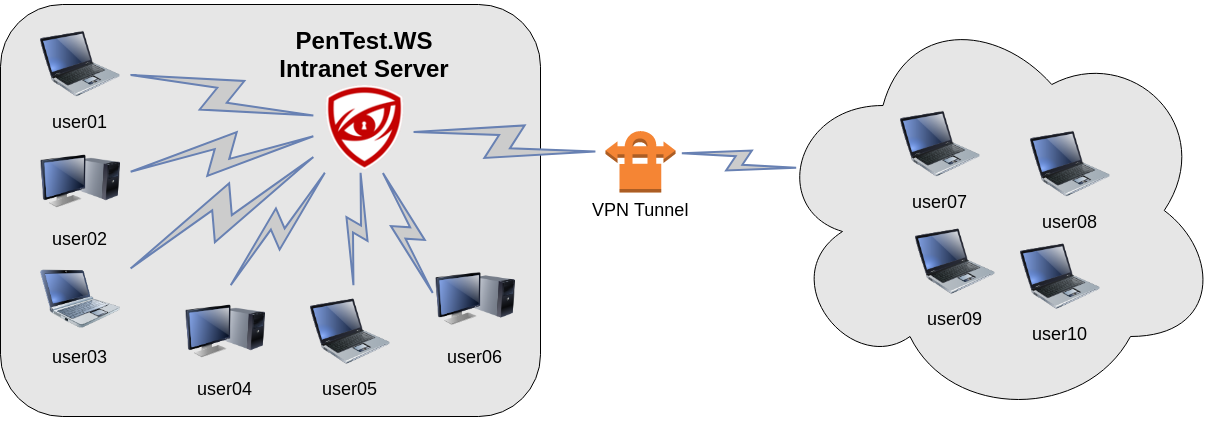
Intranet Mode:

PenTest.WS Pro installed on your intranet server allows your entire team of penetration testers to track hosts, services and record their findings as they work on client engagements.

Solo Mode:

For individual penetration testers, or field work operatives, PenTest.WS Pro runs directly inside your Kali Virtual Machine.

FAQs:

Who owns the application’s data?

You! The PenTest.WS Pro Tier Application maintains a PostgreSQL database stored on the same physical machine or virtual environment as the binary Application. The data contained in this database is the property of the licensee.

[ Read More ]

How do renewals work?

PenTest.WS Pro Tier licenses are purchased on a per-user-per-year basis. The date of first purchase becomes your license anniversary date and the license will be renewed on this date each year.

[ Read More ]

Can I purchase additional licenses?

Additional user licenses may be purchased throughout the year, with each user license sold at a prorated price based on the number of days remaining on your current license.

[ Read More ]

More FAQs can be found at store.pentest.ws

Pro Tier Status Update

At the end of June, we were fortunate enough to engage with some amazing penetration testers who have been reviewing the Pro Tier binary, ecosystem and auto-update mechanisms. Reports have been positive surrounding both the product itself and the security of the environment.

The release window has been a moving target, and a big appreciation must be given to the entire PTWS community for your patience. We’re working towards a release on August 3rd, 2019.

Pricing Announcement

Today we are announcing Pro Tier pricing!

PenTest.WS Pro Tier is priced at $249.00 per user, per year

All the benefits of the Hobby Tier, plus:

  • Pro Tier Software Updates
  • Offline Stand-Alone Application
  • Two Modes of Operation:
    • Solo Mode
    • Intranet Mode
  • Host Subnetting System
  • Host Filtering System
  • User Maintenance Control Panel

As new Pro Tier features are released, free software updates will be available through an in-app update system so you can easily stay up-to-date.

Pro Tier FAQs are now available in the new support system.

New Support System Launched

To better support the PenTest.WS community at all levels, we have launched a new support website:

support.pentest.ws

  • Submit A Ticket
  • Feature Requests
  • General Discussions
  • FAQs
  • Announcements

Support accounts are separate from PTWS accounts, but they’re free! Head on over and submit a Feature Request or be the first to start a thread in the General Discussions section.

Email support is also available at [email protected]

r/PenTestWS Now Open

Today the PenTestWS subreddit went public.

www.reddit.com/r/PenTestWS

Bare bones for the moment. Just another way to keep in touch.

Final Thoughts…

We’re nearly there. Thanks again for the continued patience and encouraging emails received throughout this year long process.