
We’re excited to drop a massive quality-of-life upgrade in version 2.4 — one that reflects how professional red teams actually operate. Here’s what’s new:
🧭 Pro Tier: Engagements Replace the Dashboard
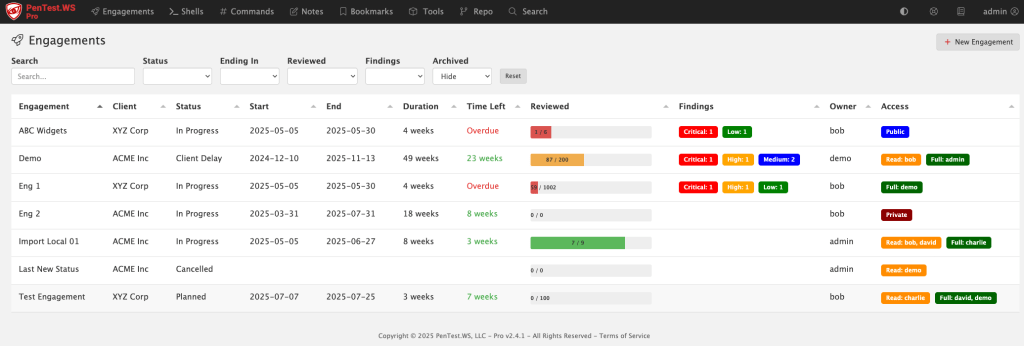
The old dashboard was built around shells and rooting boxes — but that’s not how pros manage a real engagement. We’ve replaced it with the new Engagements screen, purpose-built for tracking scope, timelines, findings, and more.
🛡️ New Global Findings View (All Tiers)
Free, Hobby, and Pro users now get access to a consolidated Findings screen. It gives you a sortable, filterable view across engagements, sorted by risk, category, or environment.
📅 Engagements Now Have Planning Metadata
Engagements now include Status, Start Date, and End Date fields — all of which are user-configurable and filterable. You can use this for planning, tracking, or just keeping your team organized.
🧪 Matrix Filters for Hosts and Ports
Tired of binary filters? The new triple-filter switch gives you full control: filter for “Yes”, filter for “No”, or don’t filter at all. It’s more intuitive, especially when tracking host review status and port exposure.
💻 Pro On-Premise – HTTP Log View
If you’re running Pro on-premise, you’ll now see an HTTP access log printed directly in your terminal. It’s great for troubleshooting or just keeping an eye on what’s happening under the hood.
🛠️ Admin Control Over Status Field (Pro)
The new status field isn’t hardcoded — it’s company-wide and admin-configurable in the Pro Tier admin panel.
🧠 Smart CIDR Expansion
Adding hosts via CIDR just got easier. If you paste in a range (like 192.168.0.1/24), you’ll be prompted to automatically expand it into individual IPs. (IPv4 only.)
✅ Support System Overhaul
Some support tickets were falling into the void (thanks, spam filters and silent failures). We’ve rebuilt our support system behind the scenes and are actively monitoring the system.
If you’re on Hobby or Free Tier and want access to the new Engagements screen, now’s the time to check out Pro. We’ve got more in the pipeline — stay tuned.
Thanks for reading!
PenTest.WS Development Team
 PenTest Workshop News