
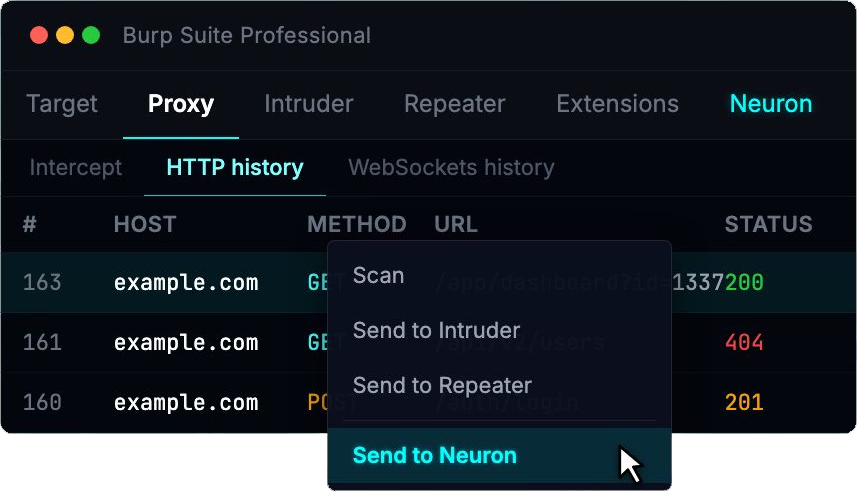
Most web testers live in Burp.
The friction usually starts after the vulnerability is identified. Screenshots are saved. Notes are copied. The finding is rebuilt somewhere else.
The Neuron Burp Suite Extension removes that duplication.
From within Burp, you can push an issue directly into Neuron. The finding is created in the correct engagement, linked to the appropriate web application and endpoint, and request/response evidence is preserved automatically.
The workflow becomes:
Proxy → Structured Finding → Report
Not:
Proxy → Notes → Screenshot folder → Word → Rebuild
Burp remains your testing engine.
Neuron becomes the system of record.
Web Applications as First-Class Assets
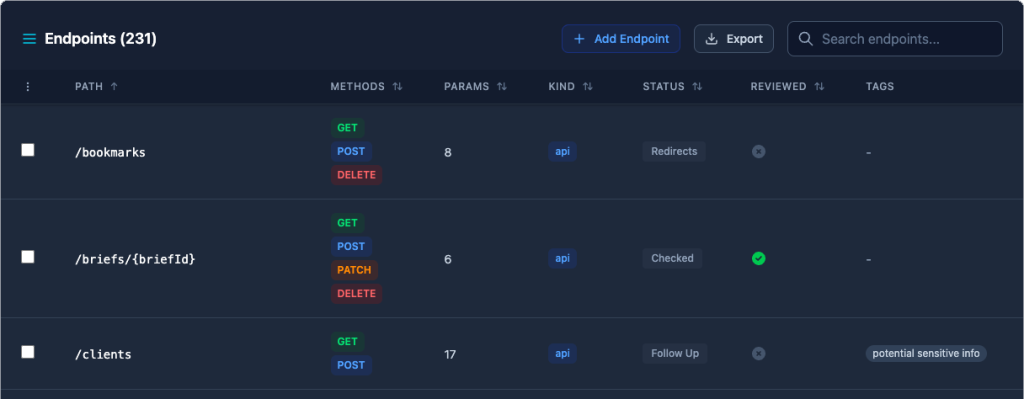
Web apps don’t map cleanly to a simple host-and-port model. They have logical boundaries, authentication flows, endpoints, parameters, APIs, and business logic that require context.
Neuron now lets you define Web Applications inside an engagement and associate:
- Hostnames and ports
- Endpoints
- Parameters
- Tags and scope metadata
- Findings tied directly to specific endpoints
Findings are no longer detached blocks of text. They are connected to the exact surface they impact.
On larger engagements, this makes it significantly easier to answer practical questions:
- What parts of the application were tested?
- Which endpoints contain findings?
- Where are we reusing issues across clients?
- What was in scope versus out of scope?
Reporting becomes a reflection of the work performed, not a reconstruction afterward.
Why This Matters for Teams

For fieldword testers, this reduces duplicate effort.
For managers, it standardizes how web findings are written and stored.
For growing practices, it ensures that web application testing lives inside the same structured system as network and internal assessments. No separate trackers. No disconnected reporting pipelines.
Web Application Testing and the Neuron Burp Suite Extension are available now.
If you’d like to see it in action, visit https://neuron.ws/demo
Thanks for reading,
The PenTest.WS Development Team
 PenTest Workshop News